

A B2B website redesign should improve how the site explains the offer, proves technical claims, supports buying-team questions, captures demand, and gives marketing a maintainable publishing system. The visual refresh matters, but it is only one workstream. A useful redesign checklist also protects valuable URLs, content, analytics, forms, integrations, and sales workflows before launch.
For a technology, data center, or IT hardware company, the site may need to serve executives, technical evaluators, procurement, channel partners, existing customers, recruits, and analysts at the same time. Those visitors do not need the same depth, but they should encounter the same positioning, product terminology, and approved evidence.
A complete B2B website redesign has nine parts:
- Define the business problem and the buyer actions the new site must support.
- Audit current demand, content, routes, integrations, and technical constraints.
- Build a page plan around buyer questions instead of the existing navigation.
- Create a governed source for product claims, specifications, and proof.
- Design reusable page sections and technical-content patterns.
- Plan SEO preservation and URL changes before development.
- Make forms, lead routing, analytics, and consent part of the experience.
- Test accessibility, performance, content, and integrations as one release.
- Operate the site as an ongoing marketing system after launch.
Start With the Redesign Decision, Not the Homepage
“The site looks dated” may be true, but it is not a sufficient project brief. It does not tell the team which business problem to solve, which visitors matter most, or what evidence would make the redesign successful.
Define the trigger. A redesign may be necessary because the company has entered a new category, merged product portfolios, changed its go-to-market model, outgrown its content management system, accumulated inconsistent pages, or made lead capture difficult to manage. Each trigger creates a different scope.
Then write a redesign decision brief with:
- Business objective: The commercial or operating result the site should support.
- Priority audiences: The roles, company types, buying situations, and technical fluency levels that matter most.
- Primary actions: The useful next steps visitors should be able to take.
- Scope boundary: The pages, languages, product families, systems, and regions included in the release.
- Success measures: The search, engagement, lead, content-operations, and sales-handoff signals that will be reviewed.
- Constraints: Launch dates, platform rules, security reviews, legal requirements, accessibility targets, integrations, and internal capacity.
- Decision owners: The people who approve positioning, product claims, UX, technical architecture, analytics, and release readiness.
A VP Marketing should be able to use this brief to explain why the project exists without showing a mood board. Visual direction comes after the team agrees on the decision the site must help buyers make.
Audit the Current Site Before Choosing What to Keep
The fastest route to a cleaner site is not deleting everything. Some unremarkable-looking pages may carry search visibility, backlinks, partner traffic, customer bookmarks, campaign history, or important technical answers. Other polished pages may have no defined audience or next step.
Build the audit at the URL level. For each indexable page, record:
- Current URL, title, template, owner, and last meaningful update.
- Primary audience, buying question, and intended next action.
- Organic impressions, clicks, rankings, entrances, and engagement.
- Backlinks, campaign links, partner references, and sales usage.
- Product names, specifications, claims, downloads, and embedded media.
- Form, CRM, marketing automation, chat, scheduling, or gated-content dependencies.
- Decision: keep, improve, consolidate, redirect, archive, or investigate.
Also inventory assets that sit outside the page body: PDFs, data sheets, diagrams, product renders, webinar recordings, demo videos, comparison tables, partner kits, documentation links, and legacy campaign files. A redesign can make the page system cleaner while accidentally making the evidence library harder to find.
Use the audit to preserve what already works and expose gaps. If a high-impression technical page has no clear route to evaluation, the problem may be its page job or CTA rather than its topic. If a product page is repeatedly sent by sales but uses outdated claims, it needs governance before a visual redesign.
Organize the New Site Around Buyer Questions
A navigation tree reflects choices the company makes about its information architecture. It should not simply mirror the org chart.
Start by listing the questions each priority visitor must answer. For example:
- What category is this company in?
- Which environments, use cases, or workloads does the product support?
- How does the approach differ from alternatives?
- What evidence supports performance, compatibility, security, or efficiency claims?
- How is the product deployed, integrated, supported, or purchased?
- Which resources can I share with engineering, finance, procurement, or a channel partner?
- What is the right next step for my stage of evaluation?
Give every proposed page one primary job. A platform overview might orient a mixed buying group. A solution page might connect an operating problem to a specific approach. A product page might help a technical evaluator understand configuration and fit. A partner page might explain program value and provide enablement resources.
When two proposed pages have the same audience, question, proof, and next action, challenge the need for both. When one page must answer ten unrelated questions, split the job or introduce progressive disclosure.
Build a Page Plan Before High-Fidelity Design
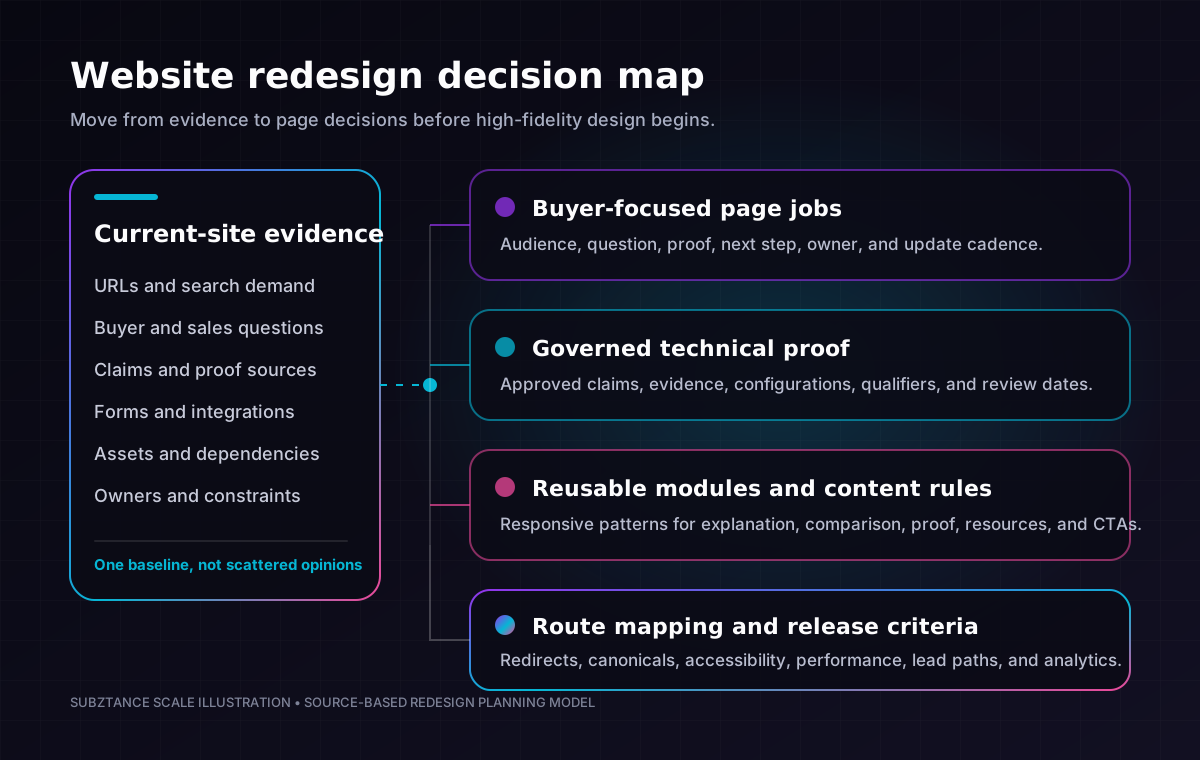
For each page, define:
- Working title and route.
- Primary and secondary audiences.
- Buyer question and page promise.
- Required proof and source owner.
- Core sections and content dependencies.
- Primary and secondary CTA.
- Related pages and internal-link purpose.
- SEO intent and migration decision.
- Template or module requirements.
- Approval owner and update cadence.
This page plan becomes the bridge between positioning, content, SEO, UX, design, development, and measurement. It also helps the team distinguish a true content gap from a request to add another decorative section.
Subztance Scale illustration, informed by Google Search Central guidance on URL mapping and redirects and the FTC's guidance on claim substantiation. Original company artwork.
Create a Governed Source for Technical Proof
Technology websites often become inconsistent because content is assembled from old decks, product notes, campaign copy, data sheets, partner pages, and memory. A redesign can make that inconsistency more visible by reproducing it in a cleaner system.
Before writing final copy, build a claims and evidence record. For each material statement, capture:
- Exact approved claim.
- Product, model, configuration, workload, or geography to which it applies.
- Evidence source and owner.
- Test conditions, limitations, dates, and required qualifiers.
- Approved short, medium, and detailed expressions.
- Expiration or review date.
- Pages and assets where the claim appears.
The U.S. Federal Trade Commission says advertisers need a reasonable basis for objective claims before an ad runs, and identifies performance, features, safety, price, and effectiveness as examples of material claims. (FTC, Advertising FAQs) A website redesign is a good time to make that evidence trail operational instead of leaving it inside review emails.
Use the record to separate four kinds of content:
- Positioning: The market frame, audience, and differentiated approach.
- Explanation: How the product, architecture, or service works.
- Evidence: Data, demonstrations, certifications, customer evidence, and documented capabilities.
- Qualification: The conditions and boundaries that keep the statement accurate.
Do not solve a weak claim by making the headline more abstract. If the evidence only supports one configuration, state the configuration. If a certification is pending, do not present it as complete. If a number came from a controlled test, keep the test context close enough for the reader to understand what it means.
The same governed content can then feed the website, technical sales collateral, partner materials, trade show graphics, presentations, and product-launch assets without recreating the proof from scratch.
Design a Modular Content System, Not a Library of One-Off Pages
A redesign should make future publishing easier. If every page is a bespoke composition, the launch may look impressive while the operating model becomes slow and fragile.
Create a restrained module library around recurring content jobs:
- Category and audience orientation.
- Problem, use case, and outcome framing.
- Product family or configuration comparison.
- Technical architecture and workflow explanation.
- Specifications, compatibility, and deployment details.
- Evidence, certification, testimonial, and case-study presentation.
- Resource, video, data sheet, and documentation access.
- Related solution, product, industry, or partner pathways.
- Contact, evaluation, demo, assessment, or partner inquiry.
For each module, define the content rules as well as the visual rules. Set limits for heading length, body depth, image ratios, comparison dimensions, proof fields, disclaimers, CTA labels, and optional elements. Show empty, long-copy, mobile, and error states before calling the module finished.
This approach gives brand and UX teams enough control to protect hierarchy while letting marketing publish without reopening foundational design decisions. It also makes localization and product-line expansion more predictable.
Subztance Scale's B2B creative services include website design and development, UI/UX, brand systems, motion, and campaign production, which is useful when the website and surrounding launch assets need to share one visual and content system.
Protect Search Visibility Before Development Starts
SEO preservation is an information-architecture input, not a launch-day checklist item.
Create the old-to-new URL map while the page plan is still changeable. Give every current URL a documented outcome: unchanged, improved in place, moved, consolidated into a relevant page, or intentionally removed. Avoid sending many unrelated old pages to the homepage.
Google's site-move guidance recommends preparing a URL mapping, implementing redirects from old to new locations, updating internal links, checking canonical and robots directives, and submitting the new sitemap. It also advises changing major elements in stages where practical because significant moves can cause temporary ranking fluctuations while pages are recrawled and reindexed. (Google Search Central, Site Moves and Migrations)
For every indexable page, verify:
- One preferred URL and a self-referencing canonical.
- A unique, descriptive title and meta description.
- One clear H1 and a logical heading hierarchy.
- Crawlable primary content and useful internal links.
- Correct index/noindex intent.
- Images with meaningful alternative text where needed.
- Structured data that matches visible content, when used.
- Inclusion in the correct sitemap.
- A direct permanent redirect from any replaced URL.
Google describes permanent server-side redirects such as 301 and 308 as signals that the destination should be canonical. Temporary redirects do not provide the same canonicalization signal. (Google Search Central, Redirects and Google Search)
Do not allow staging protections to leak into production. A release check should explicitly examine noindex, robots rules, canonical hosts, authentication barriers, and sitemap URLs on the deployed environment.
Design Lead Paths Around Buyer Readiness
Not every qualified visitor is ready to request a sales call. A technical evaluator may need a data sheet. A partner may need program information. An executive may need a concise business case. A customer may be looking for support rather than a marketing conversation.
Give each page a primary next step that matches its job, then provide a lower-commitment path where appropriate. Useful actions might include:
- Compare product families or configurations.
- Review a reference architecture or technical brief.
- Watch a short product walkthrough.
- Explore a documented implementation.
- Request an evaluation or technical consultation.
- Contact sales, partner, support, or media teams through the correct route.
Keep lead forms focused on information the next team can use. W3C's current forms guidance recommends explicit labels, clear instructions, input validation, and feedback about successful completion or errors; it also notes that people generally prefer simple, short forms. (W3C Web Accessibility Initiative, Forms Tutorial)
Test the complete handoff, not just the success message:
- The visitor understands what will happen after submission.
- Required fields and consent context are clear.
- Validation explains how to fix an error.
- A successful submission creates the expected CRM record.
- Source, page, campaign, and product context are retained.
- The lead is routed to the correct owner and region.
- The visitor receives the promised confirmation or resource.
- Duplicate, spam, test, and failure states are handled.
Google Analytics recommends generate_lead for submitted requests and provides additional recommended events for qualified, working, converted, and unconverted leads. (Google Analytics, Recommended Events) Use measurement names that can follow the lead beyond the website instead of counting every form submit as an equivalent business outcome.
Build Accessibility and Performance Into the Components
Accessibility and performance are design constraints. They become expensive when treated as audits performed after templates are approved.
For accessibility, define the target standard and include it in component acceptance criteria. Review semantic structure, keyboard operation, focus order and visibility, color contrast, text resizing, alternative text, media captions, form labels, error feedback, and interactive target size.
WCAG 2.2's minimum target-size criterion calls for pointer targets of at least 24 by 24 CSS pixels, with defined exceptions for spacing, inline content, equivalent controls, user-agent controls, and essential presentation. (W3C, Understanding Target Size Minimum) Treat that as a floor, not a reason to make important mobile actions difficult to tap.
For performance, set budgets before development. Decide how the team will handle large product renders, background video, third-party scripts, tag managers, chat tools, fonts, animations, and embedded resources. Measure representative templates on real mobile connections and production-like infrastructure.
The Core Web Vitals “good” thresholds are Largest Contentful Paint at 2.5 seconds or less, Interaction to Next Paint at 200 milliseconds or less, and Cumulative Layout Shift at 0.1 or less, assessed at the 75th percentile of page views. (web.dev, Core Web Vitals Thresholds) Use field data when it becomes available, and keep lab tests for diagnosing specific release issues.
Use This B2B Website Redesign Checklist
| Phase | Marketing decision | Required output | Release evidence |
|---|---|---|---|
| Scope | Which business problem, audiences, and actions matter? | Decision brief, measures, owners, constraints | Signed scope and decision rights |
| Audit | What demand, content, proof, and integrations already exist? | URL inventory, asset inventory, analytics baseline | Every current route has a disposition |
| Architecture | Which pages answer which buyer questions? | Sitemap, page plans, internal-link plan | No duplicate or ownerless page jobs |
| Content | Which claims and technical details are approved? | Message framework, claims record, source library | Evidence, qualifiers, and owners documented |
| Design | Which patterns should marketing reuse? | Module library, responsive states, content rules | Long-copy, mobile, empty, and error states approved |
| Build | How will the system stay fast, accessible, and maintainable? | Templates, CMS model, integrations, component tests | Acceptance criteria pass on representative pages |
| Migration | What happens to every old URL and asset? | Redirect map, canonical plan, sitemap, launch crawl | Old-to-new routes and directives verified |
| Conversion | What happens after each visitor action? | Forms, routing, CRM fields, confirmations, events | Test leads complete the full handoff |
| Launch | Who decides the release is ready? | Cross-functional release gate and rollback plan | Critical checks pass in production-like conditions |
| Operate | How will the site improve after launch? | Dashboard, backlog, publishing workflow, ownership | 30-, 60-, and 90-day reviews scheduled |
Run One Cross-Functional Website Release Gate
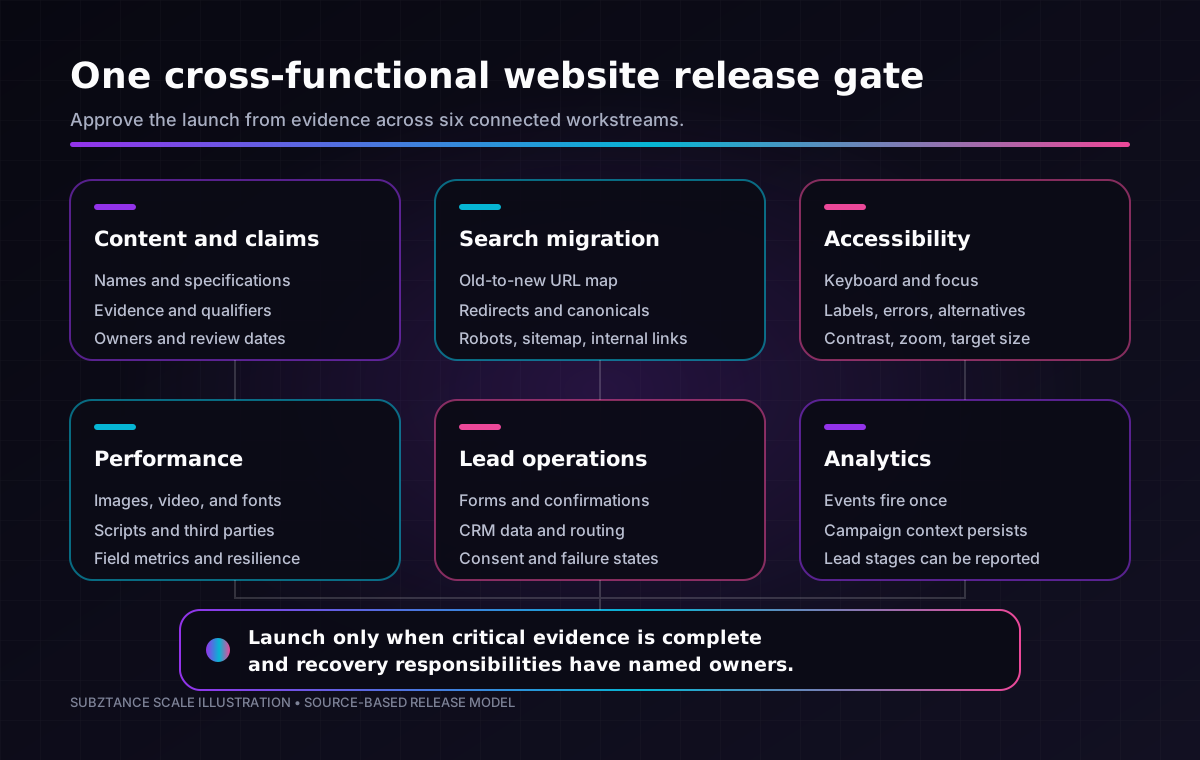
Do not make the final launch decision from a collection of “done” messages. Run one release gate with named owners and evidence.
Subztance Scale illustration, informed by WCAG 2.2, web.dev Core Web Vitals thresholds, Google Search Central migration guidance, and Google Analytics lead-generation events. Original company artwork.
Content and Claims
- Approved names, descriptions, specifications, qualifiers, dates, and evidence.
- No placeholder text, orphaned draft, broken download, or contradictory product detail.
- Page owners know what must be updated after launch.
Search and Migration
- Production crawl matches the intended route list.
- Redirects go directly to relevant final destinations.
- Titles, descriptions, H1s, canonicals, robots directives, structured data, and sitemap entries are correct.
- Important images, PDFs, and internal links resolve.
Accessibility and Responsive Behaviour
- Keyboard, focus, headings, landmarks, labels, error messages, contrast, zoom, target size, and reduced-motion behaviour are checked.
- Representative templates work at narrow, wide, and zoomed viewports.
- Captions, transcripts, and alternatives are present where required.
Performance and Resilience
- Image and video delivery, font loading, scripts, embeds, animation, caching, and error handling meet the agreed budgets.
- Core content and contact paths still work when a nonessential third-party service fails.
Lead Operations and Analytics
- Every public form, scheduler, phone link, email link, download, and primary CTA has been tested.
- CRM records, routing rules, notifications, consent fields, campaign context, and confirmation messages behave as expected.
- Analytics captures useful events once, with test traffic identifiable.
Release and Recovery
- DNS, hosting, certificates, environment variables, redirects, monitoring, and rollback responsibilities are confirmed.
- The launch team knows who can pause the release and how issues will be triaged.
- A post-launch crawl and lead-path test are scheduled, not assumed.
Plan the First 90 Days Before Launch
Launch is the start of the new operating model. Schedule the work that protects the investment:
- First 24 hours: Check critical routes, forms, redirects, analytics, uptime, Search Console, and browser errors.
- First week: Review crawl findings, lead routing, top landing pages, real-user performance, and support questions.
- First month: Compare search and conversion signals with the baseline, fix content gaps, and tune high-value templates.
- Days 30–90: Publish priority proof, strengthen internal links, expand useful product and partner content, and retire temporary launch workarounds.
Avoid judging the redesign only by total traffic in the first week. Segment branded and non-branded search, new and returning users, product and resource paths, form starts and completions, qualified leads, partner activity, and the pages sales actually uses. A technically successful launch can still reveal weak positioning or missing evidence; that is a content backlog, not necessarily a reason for another redesign.
Choose a Delivery Model That Matches the Work After Launch
A B2B website redesign combines finite project work with ongoing production. Strategy, architecture, design-system decisions, migration, and launch need coordinated ownership. New landing pages, product updates, diagrams, video, partner pages, and campaign variants continue after release.
When comparing an internal team, project agency, freelancers, or ongoing creative capacity, evaluate:
- Who owns the complete page and module system.
- Whether technical content and claims can be reviewed efficiently.
- How design, development, motion, and campaign work stay consistent.
- How quickly the team can update the site after launches and market changes.
- Whether source files, components, documentation, and publishing access are transferred cleanly.
- How workload is handled when several product, partner, event, and web priorities arrive together.
You can review Subztance Scale's website and creative work, see how the subscription workflow operates, and compare the published creative subscription plans. If a redesign or post-launch production backlog is becoming difficult to staff, start a conversation about the scope.
Treat the Website as a Buyer and Publishing System
The strongest redesigns do not merely replace an old look. They clarify page jobs, preserve valuable demand, turn technical proof into governed content, make lead paths measurable, and give marketing reusable tools for the next campaign and product release.
Use the checklist to make decisions in the right order: scope, evidence, architecture, content, system design, migration, conversion, release, and operation. The result should be easier for buyers to understand and easier for the marketing team to maintain.
Launch With Every Asset in Sync.
Senior designers who know technical B2B update your datasheets, decks, landing pages and ads, with first drafts in 1–2 business days.
- 14-Day Money-Back Guarantee
- No Contracts, Pause Anytime
- Dedicated Creative Director


