

A B2B product launch needs more than a launch announcement and a polished hero image. It needs one defensible product story translated into the assets buyers, sellers, partners, analysts, and event teams will use before, during, and after launch day.
For a technology, data-center, or IT hardware company, the essential creative system has five layers:
- A message-and-evidence brief that controls the claims.
- A visual launch system that makes every asset feel related.
- A conversion hub where prospects can understand the product and take the next step.
- Channel-specific sales, partner, event, and campaign assets.
- A QA and measurement plan that catches technical errors and shows what worked.
The checklist below is designed for senior marketing leaders who need a launch to work across a complex buying group—not only look finished on launch morning.
A B2B Product Launch Needs a Creative System, Not a Hero Asset
B2B buyers do not experience a launch in a straight line. A prospect may first see an executive post, open a partner email, compare a technical data sheet, watch a product walkthrough, visit a booth, and return to the landing page before speaking with sales.
That is normal. McKinsey's 2024 B2B Pulse research found that B2B customers use an average of 10 interaction channels during the buying journey, with company websites, in-person sales, and video conferences among the most-used touchpoints. The practical implication is that launch assets should repeat the same value story while adapting its depth and format to each channel. (McKinsey, “Five fundamental truths: How B2B winners keep growing”)
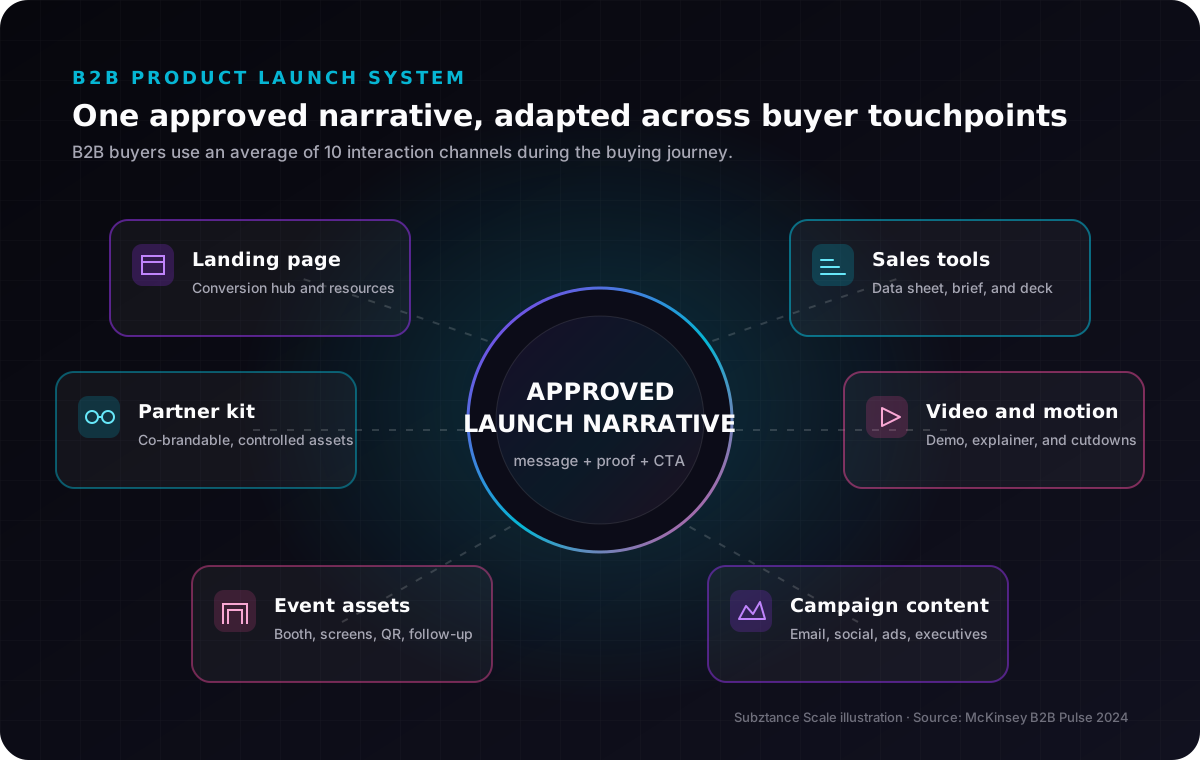
Subztance Scale illustration based on McKinsey's 2024 finding that B2B buyers use an average of 10 interaction channels. Original company artwork.
This is also why the launch cannot be reduced to product marketing copy. The 2024 Edelman–LinkedIn B2B Thought Leadership Impact Report, based on a survey of nearly 3,500 management-level professionals, found that useful expertise can influence buying behaviour beyond immediate in-market demand. For a technical launch, a credible engineering point of view, deployment guide, or architecture explanation can keep working long after the announcement fades. (Edelman–LinkedIn 2024 B2B Thought Leadership Impact Report)
Start With a Message-and-Evidence Brief
Creative production should not begin with a list of requested file sizes. It should begin with the information every file must communicate.
The launch brief should fit on one or two working pages and answer:
- Who is the priority buyer? Name the role, environment, buying trigger, and problem—not only the industry.
- What changed? State whether this is a new platform, model, capability, form factor, performance tier, service, or packaging change.
- What is the primary outcome? Express the business or operational value before listing features.
- What are the three proof points? Tie every performance, efficiency, reliability, compatibility, security, or sustainability claim to an approved source.
- What is the next step? Choose the primary conversion: request a quote, book a technical consultation, download a data sheet, find a partner, or register for a demo.
- What must not be said? Record embargoes, regional limitations, unverified comparisons, certification status, roadmap items, and claims still awaiting approval.
For hardware and infrastructure products, add a claim-control matrix. Each row should include the claim, exact approved wording, evidence source, product or SKU, geography, owner, and approval date. That small document prevents a performance number approved for one configuration from drifting into a global campaign for every model.
Country-of-origin language deserves the same discipline. The U.S. Federal Trade Commission says unqualified “Made in USA” claims generally require a product to be “all or virtually all” made in the United States, and the guidance also applies to online marketing materials. Route origin claims through the appropriate legal review instead of treating them as decorative badges. (FTC guidance on complying with the Made in USA standard)
The B2B Product Launch Creative Checklist
Not every launch needs every asset. The list is deliberately broad so you can select the minimum system required for the product, launch tier, and channel plan.
1. Launch Brief and Message Hierarchy
Approve the audience, problem, value proposition, proof, objections, CTA, and restricted claims before visual production starts. Then reduce the story into three usable levels:
- A one-sentence launch promise.
- A short paragraph for emails, social posts, and partner listings.
- A full narrative for the landing page, sales deck, and launch article.
If those versions contradict one another, the message is not ready.
2. Visual Launch System
Define the art direction that will connect the campaign: headline treatment, product framing, colour emphasis, diagram style, motion behaviour, photography or rendering rules, iconography, and channel templates.
This is a focused extension of the corporate brand, not a temporary replacement for it. The existing guide to B2B graphic design explains the broader role of visual identity, data visualization, web design, and collateral across B2B channels.
3. Product Photography, Renders, and Technical Diagrams
Build an approved image library before channel teams start improvising. Depending on the offer, that may include:
- Clean product cutouts on transparent backgrounds.
- Front, rear, port, rack, scale, and installed-environment views.
- Component or exploded views.
- Interface screenshots.
- System, network, airflow, power, or deployment diagrams.
- Short loops that show assembly, configuration, or a key interaction.
Record which model and configuration each image depicts. A beautiful render is a liability if sales cannot tell whether it shows the announced SKU.
4. Product Launch Landing Page
The landing page is the source prospects, salespeople, partners, ads, emails, QR codes, and media coverage can all reference. It should include:
- A specific outcome-led headline.
- A concise explanation of what is new.
- Priority use cases or environments.
- Approved proof and specifications.
- Product imagery or a clear architecture diagram.
- Compatibility, availability, or deployment information.
- Supporting resources.
- One primary CTA and a useful secondary CTA.
Treat performance as part of the creative brief. Google's current “good” Core Web Vitals thresholds are Largest Contentful Paint at 2.5 seconds or less, Interaction to Next Paint at 200 milliseconds or less, and Cumulative Layout Shift at 0.1 or less, evaluated at the 75th percentile. (web.dev, Core Web Vitals thresholds)
5. Technical Data Sheet
A data sheet is not a miniature landing page. It is a reference document for people comparing configurations, checking compatibility, forwarding requirements, and preparing internal approval.
Include the product identifier, essential specifications, supported configurations, environmental or power requirements where relevant, certifications only when confirmed, ordering information, document version, and a route to current technical documentation. Make the PDF legible on screen as well as in print.
6. Solution Brief or Application Guide
Explain where the product fits in a real operating environment. For a data-center launch, that may mean workload, rack, networking, power, cooling, management, or migration context. For an IT hardware manufacturer, it may mean deployment patterns, supported peripherals, fleet management, or serviceability.
This asset answers “How would this work here?” while the data sheet answers “What exactly is it?”
7. Sales Deck and Modular Sales Slides
Give sales a short launch deck and a set of modular slides they can insert into account-specific presentations. Include:
- The buyer problem and trigger.
- The new product story.
- Differentiation with evidence.
- Use cases.
- Architecture or workflow.
- Objection-handling slides.
- Availability and next steps.
Provide speaker notes and editable source files. A deck that only marketing can safely present will not scale.
8. Demo, Explainer, and Motion Assets
One long video rarely serves every channel. Build a master narrative that can produce:
- A 60–120 second product overview.
- A focused technical walkthrough.
- Short clips for social and email.
- Silent booth or event loops.
- Animated diagrams for sales presentations.
- Captioned versions for accessible playback.
The strongest technical videos show the product solving a problem. They do not spend the opening half on an abstract logo animation.
9. Launch Email and Nurture Sequence
Prepare distinct messages for customers, prospects, partners, and internal teams. A good launch email tells the reader what changed, why it matters to their environment, and where to get the right level of detail.
Plan the follow-up before the first send. The second touch might promote the technical guide; the third might answer a common implementation objection or invite the account to a demo.
10. Organic and Paid Campaign Kit
Create a controlled set of campaign variants rather than exporting one visual into every size. Include channel-specific headlines, product crops, proof points, video cutdowns, CTA language, and accessibility notes.
Keep campaign measurement consistent. Google Analytics recommends a standardized UTM strategy and warns that inconsistent, case-sensitive naming can fragment reporting. At minimum, define utm_source, utm_medium, and utm_campaign; use utm_content to distinguish creative variants when it helps the analysis. (Google Analytics guidance for campaign URLs)
11. Partner and Distributor Launch Kit
Partners need assets they can use without rewriting the story. Package:
- A partner-ready launch overview.
- Approved short and long descriptions.
- Co-brandable email and social templates.
- Product images and diagrams.
- Data sheets and solution briefs.
- A short sales deck.
- Campaign links with partner-specific tracking.
- Clear rules for logos, claims, localization, and expiration.
Assign one location as the source of truth. An emailed ZIP becomes stale as soon as a specification or launch date changes.
12. Trade Show and Field Event Kit
If the launch is tied to an event, design the physical and digital experience together. Typical needs include booth graphics, demo station screens, product labels, lead-capture pages, QR destinations, sales leave-behinds, presentation slides, follow-up email, and social content for the field team.
Check legibility at the real viewing distance. A detailed specification diagram that works in a PDF may be useless on a screen six metres from the aisle.
13. Analyst, Media, and Executive Kit
Prepare a concise briefing deck, approved product background, executive talking points, product images, bios, press contact, launch article, and links to supporting resources.
Executives also need channel-ready material they can make their own: a point of view, a few proof-backed observations, and product visuals sized for the platforms they actually use.
14. Customer Proof, FAQ, and Objection Handling
Use only proof you can document. If a customer result is not approved for publication, do not let it migrate into a sales slide, booth graphic, or launch video.
Build a shared FAQ covering configuration, integration, migration, availability, support, pricing approach, and the objections discovered during beta, partner, or sales conversations. The FAQ can feed sales enablement, the landing page, follow-up content, and the launch-day response plan.
15. Measurement Dashboard and Post-Launch Content Plan
Before launch, document:
- Primary and secondary conversions.
- Channel and campaign naming.
- Baseline dates.
- Landing-page events.
- Form and CRM routing.
- Partner tracking.
- Reporting owners.
- The first three post-launch content pieces.
Post-launch content should deepen the story rather than repeat the announcement. Good follow-ups include a deployment guide, engineering interview, compatibility explainer, benchmark methodology, event recap, or use-case video.
Choose the Minimum Viable Launch Kit by Launch Tier
The checklist becomes manageable when the company agrees on launch tiers.
Tier 1: Strategic Product or Platform Launch
Use the full system: launch identity, conversion page, technical content, sales enablement, video, partner kit, event support where relevant, executive content, campaign variants, and post-launch production.
Tier 2: Major Model, Capability, or Market Expansion
Prioritize the landing page, updated visual system, product imagery, data sheet, solution brief, modular sales slides, campaign kit, partner update, and measurement plan. Reuse proven formats when the story remains consistent.
Tier 3: Feature, Configuration, or Availability Update
Start with the approved message, web update, technical documentation, sales slide, customer or partner communication, and targeted campaign assets. Do not manufacture a major campaign when the buying impact is narrow.
The tier should reflect commercial significance and audience impact—not which internal stakeholder is asking most loudly.
Build the Launch Backward From Channel Deadlines
Launch day is a dependency, not a production plan. Work backward from the moments when assets must be delivered to media, partners, event vendors, sales training, web development, localization, and paid channels.
A practical eight-week sequence looks like this:
- T–8 to T–7: confirm launch tier, brief, evidence, audience, CTA, owners, and approval path.
- T–7 to T–6: establish the visual system; scope photography, rendering, diagrams, video, web, and technical documents.
- T–6 to T–4: produce the conversion hub and master assets first.
- T–4 to T–3: adapt sales, partner, event, email, executive, and campaign materials from the approved masters.
- T–3 to T–2: complete claim, technical, legal, accessibility, analytics, and production QA.
- T–2 to T–1: train sales and partners; load platforms; test forms, CRM routing, links, QR codes, captions, and downloads.
- Launch week: monitor questions, broken journeys, asset requests, and channel performance.
- T+1 to T+4: publish depth content, refine enablement, document lessons, and archive superseded files.
If the schedule compresses, reduce the number of assets before reducing review quality. A smaller accurate launch kit is more useful than a large inconsistent one.
Run a Technical and Creative QA Gate
Assign one owner to coordinate final QA, but do not make that person the sole reviewer. Engineering or product should verify specifications; legal or compliance should review controlled claims; marketing should review narrative and conversion; creative should review production quality; web and marketing operations should verify delivery and measurement.
Content and Claim QA
- Product name, model numbers, units, configurations, and availability match the source of truth.
- Comparisons have an approved basis and time frame.
- Certifications and origin claims are accurate for the marketed region.
- Customer quotes and results have written approval.
- Roadmap language is clearly separated from available capability.
Web and Accessibility QA
- Mobile and desktop layouts preserve hierarchy and CTA visibility.
- Images have appropriate alternatives. W3C guidance recommends brief descriptions for informative images and equivalent text elsewhere for complex graphics. (W3C WAI alt-text decision tree)
- Videos include captions; diagrams remain legible when enlarged.
- Forms, confirmation messages, downloads, and CRM routing work.
- Page performance is tested with the final media, scripts, and embeds.
Production and Distribution QA
- Links and QR codes resolve to the intended live or embargoed destination.
- UTM values follow the launch naming standard.
- Print files have correct dimensions, bleed, colour mode, and resolution.
- Display and social files match current platform specifications.
- Partners receive current files, usage rules, and expiration dates.
- Editable source files, fonts, licenses, and approved exports are archived.
Decide How to Staff Launch Production
The work rarely arrives in a smooth sequence. A data sheet changes after engineering review; the landing page needs a new diagram; a partner asks for a co-branded deck; the trade-show screen requires another aspect ratio; and leadership wants a video cutdown.
Before committing to a date, map the required capabilities—not only the number of assets. A technical launch may need brand design, information design, presentation design, web design and development, motion graphics, video editing, copy support, production art, and marketing operations.
If the internal team cannot cover the peak, add capacity early enough to learn the product story. Subztance Scale's B2B creative services cover graphic design, landing pages, motion, video, and brand systems; the subscription workflow is designed to keep related requests moving through one prioritized queue. You can also review selected work and subscription pricing before deciding whether embedded senior capacity fits the launch.
Turn the Launch Into a Reusable Creative System
The best launch package leaves the marketing organization faster than it found it. Archive the approved message hierarchy, claim matrix, product image library, diagrams, landing-page modules, presentation slides, motion templates, partner components, UTM rules, and QA checklist.
Then hold a short post-launch review:
- Which assets influenced useful conversations?
- Where did sales or partners create their own material?
- Which questions appeared repeatedly?
- What took longest to approve?
- Which technical facts changed late?
- What should become a template before the next launch?
That review turns launch pressure into operating leverage.
If your next product launch needs more senior creative capacity than the internal team can supply, tell us what is shipping and when. We can help scope the launch system, prioritize the must-have assets, and build a production queue around the date.
Launch With Every Asset in Sync.
Senior designers who know technical B2B update your datasheets, decks, landing pages and ads, with first drafts in 1–2 business days.
- 14-Day Money-Back Guarantee
- No Contracts, Pause Anytime
- Dedicated Creative Director


