

B2B campaign design is the visual and production system that turns one campaign strategy into a coherent set of buyer-facing assets. It connects the message, evidence, offer, and call to action across landing pages, paid media, social posts, email, partner marketing, trade shows, video, and sales follow-up.
For a technology, data center, or IT hardware company, the goal is not to make every asset look identical. The goal is to make every touchpoint feel connected, stay technically accurate, and help the right buyer take the next step.
A scalable B2B campaign design system has seven parts:
- One measurable campaign objective.
- A controlled message-and-evidence source.
- A recognizable visual idea.
- Modular content and design components.
- A channel-specific asset matrix.
- A defined review and release workflow.
- Measurement that distinguishes audiences, channels, and creative variants.
Why B2B Campaign Design Needs a System
A B2B campaign rarely lives in one place. McKinsey's 2026 Global B2B Pulse research, based on nearly 4,000 decision-makers across 13 countries, found that buyers use an average of 10 channels during the purchasing journey. The same research identifies inconsistent information as a leading reason buyers switch suppliers. (McKinsey, "The surprising economics of B2B growth")
That creates a practical creative problem. A campaign may begin with a landing page, but it quickly expands into display ads, LinkedIn graphics, email modules, partner banners, presentation slides, event screens, short-form video, and sales follow-up. When every item is briefed and designed separately, claims drift, visual quality varies, and production slows down.
The capacity problem is especially relevant to industrial and technical marketers. Content Marketing Institute's manufacturing research found that 66% of respondents struggled to create content that prompts action, 54% struggled to create consistently, and 50% struggled to create enough content. (Content Marketing Institute, manufacturing content marketing research)
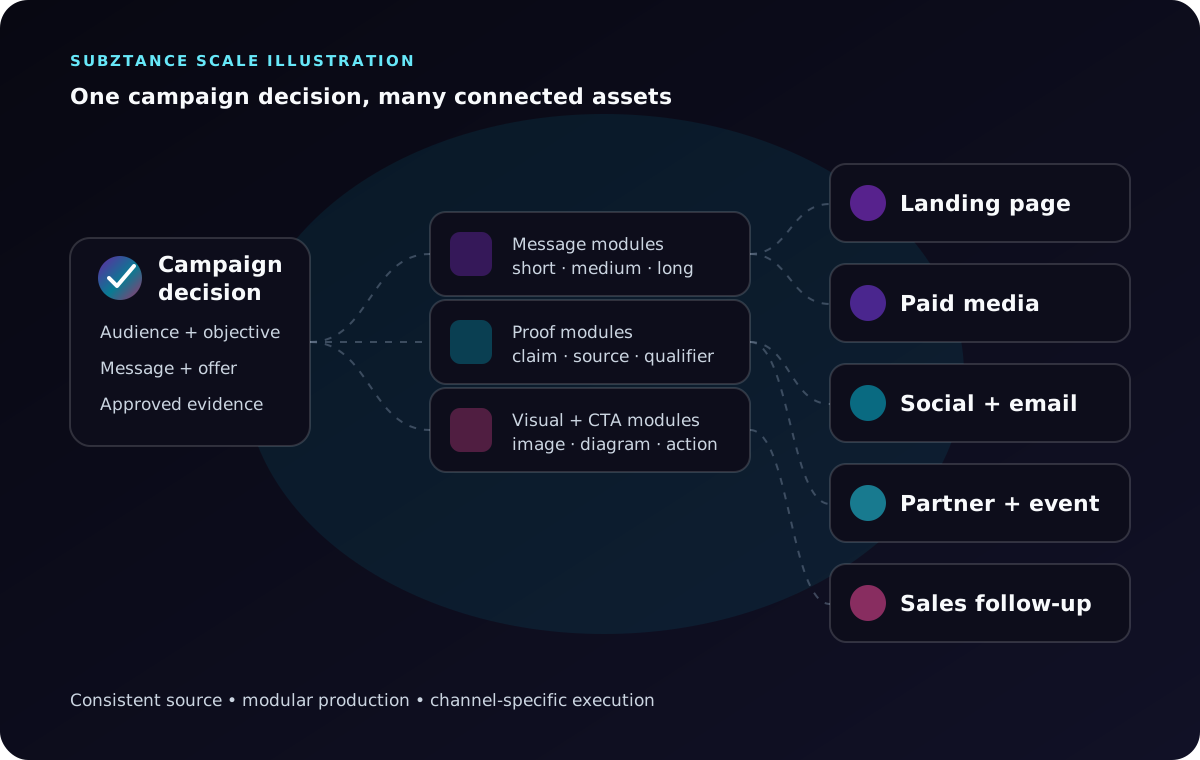
Subztance Scale illustration informed by McKinsey's 2026 B2B channel research and Content Marketing Institute's manufacturing benchmarks. Original company artwork.
The answer is not a larger pile of templates. It is a controlled system that separates what must remain consistent from what should change by audience, channel, and stage.
Start With the Campaign Decision, Not the Deliverables
Before opening a design file, write a one-page campaign decision brief. It should be specific enough to settle the questions that otherwise reappear in every asset review.
Include:
- Business objective: What should change if the campaign works?
- Primary audience: Which buying role, account type, or market segment comes first?
- Buying situation: What event, constraint, or priority makes the message relevant now?
- Offer: What useful next step are you asking the audience to take?
- Primary message: What is the one idea the audience should remember?
- Evidence: Which approved facts make the message credible?
- Call to action: What action should the asset prompt?
- Channels: Where will the campaign appear and how will each channel contribute?
- Constraints: Which claims, specifications, legal terms, partner rules, or regional requirements apply?
- Measurement: Which outcome, leading indicators, and creative variables will be tracked?
For example, a server manufacturer promoting a new high-density platform might define the campaign objective as qualified evaluation requests from North American data center operators. The campaign message could focus on fitting more compute into constrained environments, while the evidence set contains only approved configuration, power, cooling, serviceability, and benchmark details.
That is more useful than starting with “we need six ads and a landing page.” Deliverables are outputs. The decision brief explains why each output exists.
Build a Message-and-Evidence Source
Campaign consistency begins with a controlled content source. This can be a working document, database, or structured brief, but it should have an owner and a visible version.
Record:
- The approved campaign name and short description.
- Audience-specific problems and desired outcomes.
- Headline, supporting message, and proof-point options.
- Approved product names, model numbers, and terminology.
- Evidence for performance, compatibility, security, sustainability, availability, and service claims.
- Required qualifiers, footnotes, and restricted wording.
- Approved customer proof or third-party validation.
- Primary and secondary calls to action.
- Destination URLs and campaign tracking rules.
- Owner, approvers, version, and review date.
For every material claim, keep the evidence beside the wording. If a performance result applies only to one configuration or test method, the campaign should not imply that it applies universally.
This source is the campaign layer above the maintained product story. Our B2B sales collateral guide covers the deeper governance needed for product brochures, data sheets, diagrams, and seller-facing evidence.
Concept One Recognizable Campaign Idea
Campaign concepting turns the decision brief into one creative idea the whole campaign can share. Work from the primary message and the evidence, not from a mood board: sketch two or three distinct concepts, then test each one against the hardest formats before choosing.
A quick concept test:
- Does the idea still read in a narrow display ad and a square social tile?
- Can it carry a proof point or a data callout without clutter?
- Will it work as a six-second video and on a trade show screen?
- Can a partner's brand sit inside it without breaking it?
Choose the concept that passes all four, even if another one looks better as a single hero image. A campaign needs a visual idea strong enough to connect its assets, but flexible enough to survive different formats.
The system may include:
- A campaign color emphasis within the master brand palette.
- A distinct type treatment or headline rhythm.
- One illustration, diagram, product-render, or photography direction.
- A repeatable composition device.
- A motion behaviour for video and animated media.
- A proof-point or data-callout pattern.
- A consistent CTA treatment.
For an infrastructure campaign, the visual idea might use a modular rack grid that expands as capacity increases. A cybersecurity campaign might use controlled layers that reveal protected systems and evidence. A partner campaign might use a shared architecture diagram with reserved zones for both brands.
Avoid building the concept around one horizontal hero image. The idea must still work in a narrow display ad, a square social tile, a presentation slide, a six-second video, and a trade show screen.
This is where general B2B graphic design principles become a campaign operating system: hierarchy, information design, brand consistency, and channel adaptation all work from the same creative premise.
Design Modular Components Before Channel Variants
Modularity does not mean that every asset uses the same layout. It means approved components can be rearranged without rebuilding the campaign story.
Create reusable components for:
- Short, medium, and long headlines.
- Audience-specific problem statements.
- Product or solution descriptions at multiple lengths.
- Feature-to-outcome pairs.
- Proof points and their qualifiers.
- Product renders, diagrams, icons, and data visualizations.
- Customer or analyst proof where publication is approved.
- CTA labels and destination links.
- Partner-lockup zones.
- Legal text, document versions, and campaign identifiers.
Then define which components are mandatory, optional, or prohibited in each format.
A 300-by-250 display ad may support one short headline, one product visual, and one CTA. A landing page can explain the problem, solution, proof, use cases, and next step. A sales slide can give the same proof more context. They are not copies of one another, but they should be traceable to the same source.
Build the Channel Asset Matrix
The asset matrix converts the campaign plan into a production map. It prevents late surprises and makes dependencies visible.
| Channel asset | Primary job | Essential content | Common technical checks |
|---|---|---|---|
| Landing page | Explain the offer and convert interest | Message, evidence, use case, CTA, related resources | Responsive layout, page speed, form path, analytics |
| Paid and display ads | Earn qualified attention | Short message, focal visual, CTA | Platform sizes, safe zones, file weight, tracking URL |
| Organic social | Build recognition and engagement | Insight, proof, diagram, or short video | Crop behaviour, captions, alt text, mobile legibility |
| Email modules | Move known audiences to the next step | Subject idea, supporting message, CTA | Dark mode, live text, image blocking, tracked links |
| Partner marketing | Extend reach through another brand | Shared value, approved lockup, partner CTA | Co-brand rules, editable zones, owner approval |
| Event and trade show creative | Create recognition at distance | Campaign idea, short proof, destination | Viewing distance, screen ratio, print output, QR fallback |
| Sales follow-up | Help a buying group evaluate | Recap, proof, resource links, next step | Current versions, usable source files, CRM route |
Start with the smallest useful campaign rather than producing every possible asset. A focused program might begin with a landing page, three paid concepts, a social set, an email module, a sales slide, and one partner-ready version. Add formats when the channel plan justifies them.
If the campaign supports a product introduction, use the B2B product launch creative checklist to coordinate readiness, deadlines, partner kits, technical QA, and launch tiers.
Plan Variation Without Losing the Campaign
Most B2B campaigns need variation across buying roles, industries, applications, regions, and funnel stages. Decide the variation model before production begins.
Change the Emphasis, Not the Facts
A facilities leader may care about power and cooling constraints. An IT leader may care about manageability and compatibility. Finance may care about lifecycle assumptions. The evidence may be shared, but the order and explanation should change.
Use a Simple Variant Code
Give each asset an identifier that exposes its purpose. A practical pattern is:
campaign-audience-channel-concept-size-version
For example:
density-ops-linkedin-proof-1200x1200-v03
The exact convention matters less than using it consistently. It should be possible to tell which campaign, audience, channel, concept, format, and version an asset represents without opening the file.
Keep Rights and Usage Information With the Asset
Store source, creator, license, expiry, market, model-release, and usage restrictions with photography and third-party visuals. The International Press Telecommunications Council describes descriptive, rights, and administrative metadata as essential for identifying images, protecting copyright, finding assets, and tracking their use. (IPTC, "What Is Photo Metadata?")
This matters when campaign files move between internal teams, agencies, distributors, resellers, and regional partners.
Add Motion as a System, Not an Afterthought
Motion should express the campaign idea, not merely animate the final layout.
Define:
- Opening and closing states.
- Type and data transitions.
- Product or diagram movement.
- Pacing for six-, fifteen-, and thirty-second formats.
- Caption and sound-off behaviour.
- End-card timing and CTA treatment.
- Safe zones for each platform.
- Reduced-motion or static alternatives where relevant.
For a hardware campaign, a modular system could animate components joining a rack, data moving through a topology, or capacity expanding through a grid. Those behaviours can appear in a product walkthrough, short social clip, event loop, and animated display unit without inventing a new style each time.
Establish a Review and Release Gate
Campaign production usually breaks at the interfaces between marketing, product, engineering, legal, partners, and creative. Use one release gate with clear responsibilities.
Message and Technical Review
- The audience, offer, and CTA match the campaign brief.
- Product names, specifications, diagrams, and terminology are current.
- Claims are supported, qualified, and approved for the intended market.
- Partner and customer references have publication approval.
Creative and Accessibility Review
- The campaign remains recognizable across sizes and channels.
- Hierarchy and key labels remain legible at the real output size.
- Colour is not the only way information is communicated.
- Informative images have useful alternative text; decorative images use empty alt text.
- Video includes captions and supports sound-off viewing.
W3C's image decision tree recommends brief alternative text when an image contributes meaning and an empty alternative when an image is purely decorative or redundant. Complex graphics should also have their information available elsewhere on the page. (W3C Web Accessibility Initiative, alt decision tree)
Production and Distribution Review
- File dimensions, formats, weight, bleed, colour mode, and safe zones are correct.
- Links, forms, QR codes, and destination pages work.
- Tracking parameters follow the campaign taxonomy.
- Rights and expiry information are attached to the asset record.
- Final source files and exports are archived.
- Superseded versions are removed from active distribution.
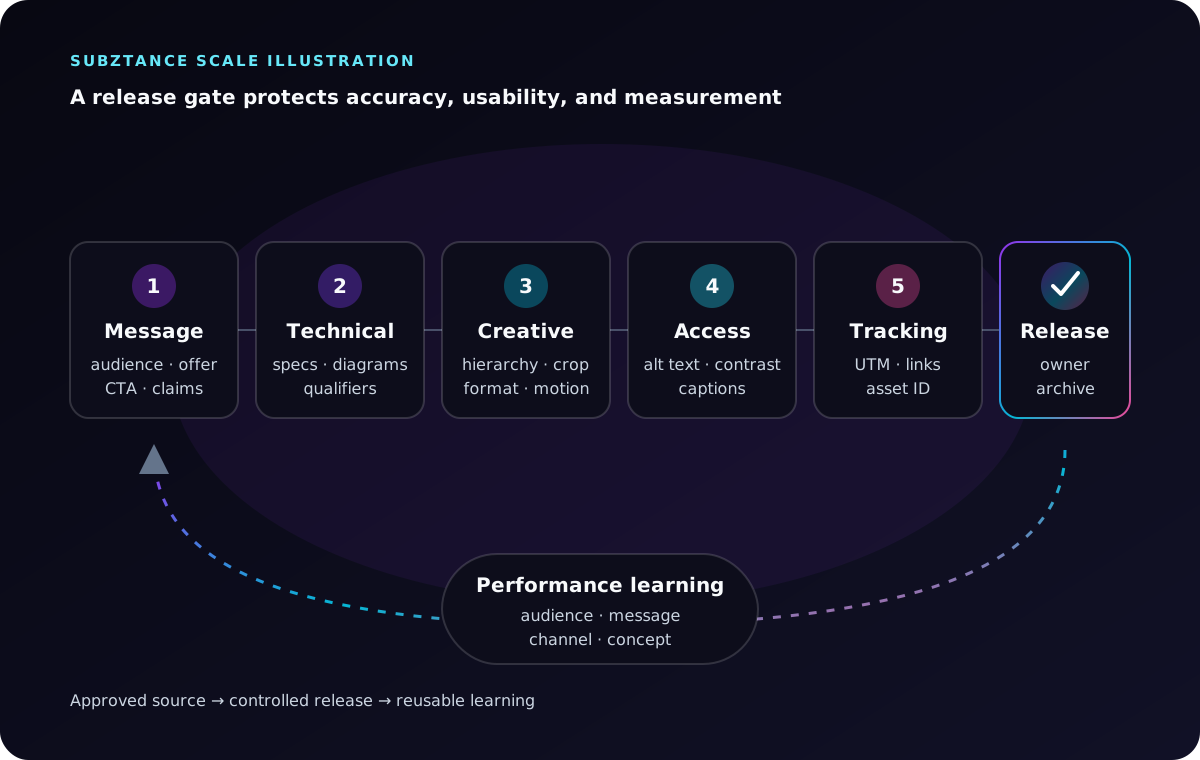
Subztance Scale illustration based on W3C image guidance, IPTC asset-metadata guidance, and Google Analytics campaign-tagging guidance. Original company artwork.
One release owner should confirm that all required checks are complete. Approval by committee without a release owner creates delay without accountability.
Measure the Campaign and the Creative System
Measurement should answer two questions:
- Did the campaign move the intended audience toward the desired action?
- Which message, format, and channel combinations deserve another iteration?
Track outcomes such as qualified form submissions, demo or evaluation requests, partner referrals, event meetings, sales-accepted leads, pipeline influence where your systems support it, and content-assisted opportunities.
Also track leading indicators:
- Qualified landing-page visits and engaged sessions.
- CTA clicks and form-start rate.
- Asset or video completion.
- Performance by audience, channel, format, and concept.
- Partner usage and referral traffic.
- Sales adoption of campaign materials.
- Recurring questions that reveal missing evidence.
Google Analytics recommends setting the relevant campaign parameters consistently when manually tagging links. Use utm_source, utm_medium, and utm_campaign across campaign destinations, then use utm_content to distinguish creative variants. (Google Analytics, traffic-source and manual-tagging guidance)
Do not change five variables at once and call the result a creative test. Record the hypothesis behind each variation:
- Audience: operations leaders.
- Message: capacity without facility expansion.
- Format: short diagram animation.
- CTA: view the technical architecture.
- Expected signal: higher qualified click-through and architecture-page engagement.
That record turns campaign performance into reusable knowledge for the next brief.
Staff for the Production Load You Actually Have
Campaign strategy may be periodic, but production arrives in waves. A small internal team can own audience knowledge, product truth, campaign decisions, and approvals while external senior specialists add the design, web, motion, video, presentation, and production capacity needed to ship the system.
Before choosing a model, estimate:
- Number of active campaigns.
- Channels and formats per campaign.
- Audience and regional variants.
- Motion, video, web, and event requirements.
- Review complexity.
- Expected update frequency.
- Peak periods around launches, trade shows, and partner programs.
If one team must coordinate a different freelancer or agency for each discipline, the integration cost can become the bottleneck. Review the range of creative services available through Subztance Scale and the prioritized subscription workflow when comparing ongoing capacity options.
Turn the Next Campaign Into a Reusable System
Start with one upcoming campaign. Write the decision brief, establish the evidence source, choose the visual idea, build the component set, and map only the channel assets that have a clear job.
Then retain what should outlive the campaign:
- Approved message and proof modules.
- Design and motion components.
- File and UTM naming conventions.
- Review checklists.
- Partner-ready source files.
- Performance learnings by audience and format.
The result is not just a more consistent campaign. It is a faster and more reliable way to turn technical marketing decisions into creative work across every channel.
If your team needs senior creative capacity for the next campaign, share the audience, offer, channels, and deadline. We can help turn the brief into a coordinated system of landing pages, campaign graphics, partner assets, event creative, presentations, motion, and video.
Launch With Every Asset in Sync.
Senior designers who know technical B2B update your datasheets, decks, landing pages and ads, with first drafts in 1–2 business days.
- 14-Day Money-Back Guarantee
- No Contracts, Pause Anytime
- Dedicated Creative Director


