

A B2B trade show marketing system connects the event promise, booth experience, technical proof, sales collateral, lead capture, and follow-up around one buyer action. It gives every asset a specific job before, during, and after the show instead of treating the booth, emails, demo, handouts, and post-event campaign as separate projects.
For a technology, data center, or IT hardware company, that coordination matters. A visitor may see a pre-show post, scan the booth from the aisle, inspect a live system, ask an engineer a detailed question, forward a data sheet to a colleague, and revisit the landing page weeks later. The story should remain recognizable at every step while the level of technical detail changes.
A complete trade show marketing asset system has eight parts:
- One event objective and a defined next buyer action.
- An approved story with substantiated technical claims.
- A visual hierarchy for distance, conversation, and close inspection.
- A demo and evidence package that can survive show-floor conditions.
- Pre-show, on-site, and post-show creative assets.
- Lead capture that records context and consent, not just badge scans.
- A dedicated landing page and consistent measurement conventions.
- A release gate, follow-up plan, and reusable event library.
Why B2B Trade Show Marketing Needs One Asset System
An in-person event compresses a long buying journey into a noisy physical space. Brand, product, sales, engineering, executives, partners, and event vendors may all be producing parts of the experience at once. Without one source of truth, the back wall makes one promise, the demo proves something else, the one-sheet uses old terminology, and the follow-up email sends everyone to the homepage.
That is more than a consistency problem. It wastes the reason buyers came in person: to assess people, products, and evidence directly. Freeman's 2025 Trust Report, based on a Harris Poll survey of 1,824 U.S. working professionals who had attended an in-person business or professional event in the previous year, found that 95% trusted brands more after an in-person event. The report also found that 93% of event decision-makers said live events positively affect brand trust. (Freeman, 2025 Trust Report)
Creative execution should help the team earn that trust. The booth is not a large advertisement with a lead scanner attached. It is a temporary product experience supported by a campaign before the doors open and a sales-enablement system after they close.
If the show is also introducing a new platform, model, or capability, coordinate this event package with the broader B2B product launch creative checklist.
Start With the Business Outcome and Buyer Action
Choose one primary event outcome before choosing booth graphics or swag. Reasonable primary outcomes include:
- Create qualified conversations in a new market.
- Book technical evaluations or discovery meetings.
- Introduce a product to customers, partners, or analysts.
- Help channel partners understand and present a new offer.
- Advance named accounts already in an active buying process.
- Learn which use cases, objections, or proof points resonate.
Then define the next action the experience should make easier. “Generate awareness” is too vague for an asset brief. “Help infrastructure leaders book a 30-minute density-planning session” gives the booth message, demo, landing page, CTA, qualification fields, and follow-up a common direction.
Write an event decision brief with:
- Ideal visitor: Role, company type, operating environment, and technical fluency.
- Buying situation: The change, risk, deadline, or initiative creating urgency.
- Event promise: The useful outcome a visitor can understand within seconds.
- Proof: The approved demonstration, architecture, performance evidence, customer evidence, or expert access that makes the promise credible.
- Interaction: What the visitor can see, try, compare, calculate, or discuss.
- Next action: The smallest useful commitment after the conversation.
- Owners: The marketing, sales, product, engineering, partner, and legal reviewers responsible for decisions.
Use the same decision brief to govern the surrounding B2B campaign design system, so paid, organic, email, partner, and sales activity are not briefing separate versions of the event.
Build One Approved Event Story
Technical teams often bring too many messages to the show floor. Every product group wants a panel. Every capability becomes a bullet. The result may be accurate but impossible to understand while someone is walking past.
Build the story in four layers:
1. Category and Audience
State what the company or featured solution is and who it helps. Do not make the visitor infer the category from a product name.
2. Buyer Problem or Opportunity
Name the operating issue the visitor recognizes: deployment speed, power density, serviceability, lifecycle cost, interoperability, security, data movement, partner readiness, or another specific concern.
3. Differentiated Approach
Explain how the organization addresses that issue. Use one defensible idea rather than a list of adjectives.
4. Proof and Next Step
Show the evidence available at the booth and the action a relevant visitor can take. A useful CTA might be “Compare deployment options,” “Review the reference architecture,” or “Book a technical planning session.”
Create an approved message sheet containing the exact product names, category language, short promise, supporting points, evidence sources, required qualifiers, CTA, and prohibited or outdated wording. This becomes the source for signage, demo scripts, speaker slides, social copy, partner variants, one-sheets, and follow-up.
Design the Booth Message for Three Distances
A booth should reveal more detail as a visitor moves closer. Treating every surface as a brochure produces small type, weak hierarchy, and visual competition.
Aisle Distance: Earn the Second Look
Use the largest surface for the category, the visitor-relevant promise, and one focal visual. A product render, labelled system view, or clear use-case image usually does more work than a decorative stock scene.
Conversation Distance: Make the Story Easy to Explain
At a few steps away, provide the three or four supporting ideas a seller or expert needs to guide a conversation. These may be use cases, architecture stages, deployment options, or a simple comparison.
Inspection Distance: Let Buyers Verify the Evidence
Reserve detailed specifications, diagrams, data, citations, and qualifiers for screens, demo stations, data sheets, or a focused landing page. The detail remains available without turning the back wall into a document.
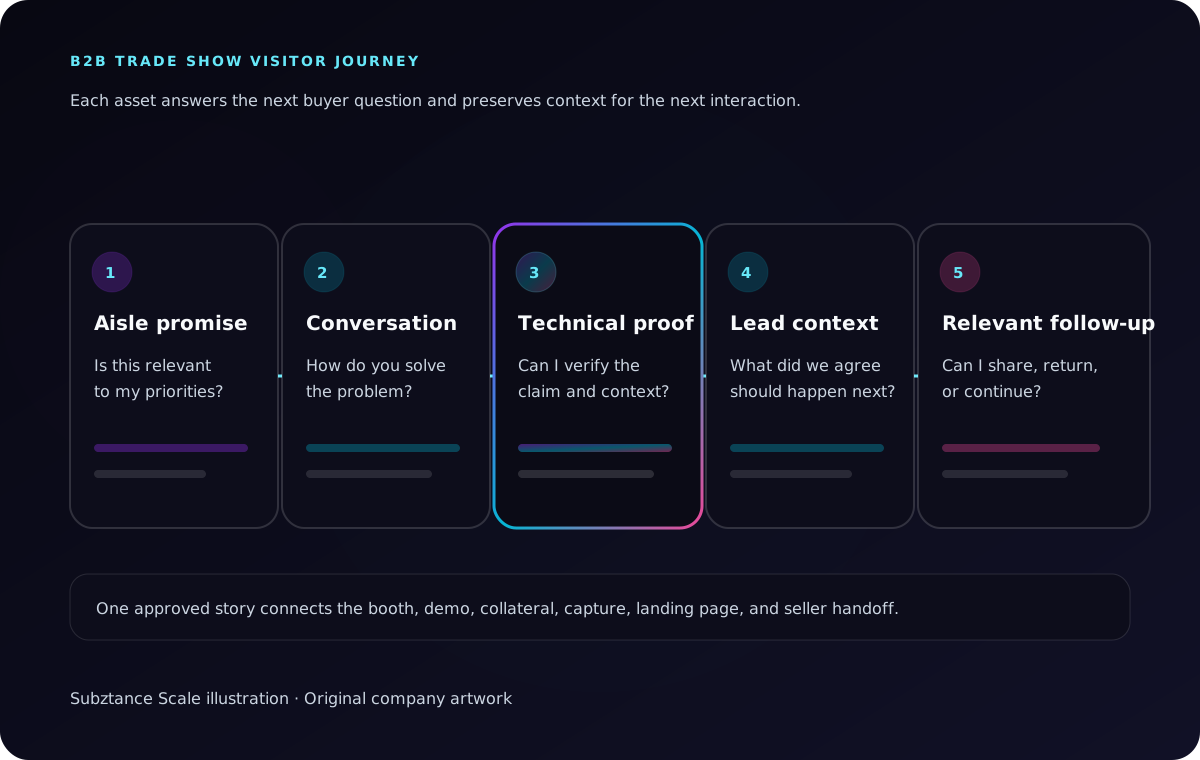
Subztance Scale illustration, informed by Freeman's 2025 Trust Report on how in-person events affect brand trust and attendee action. Original company artwork.
Test the hierarchy at output size. Print a scaled panel, view it across a room, put the demo loop on its actual screen, and ask someone outside the project to explain the offer after five seconds. If they repeat an internal product name but not the buyer problem, the hierarchy needs another pass.
Plan the Technical Demo and Evidence Package Together
For complex technology, the demonstration is often the centre of the experience. It should not be a product-manager improvisation surrounded by unrelated signage.
Define the demo as a short narrative:
- Starting condition: What environment, workload, or constraint is the visitor looking at?
- Change: What does the product or approach do?
- Visible evidence: Which output, behaviour, comparison, or measurement demonstrates the change?
- Boundary: Under which configuration, test condition, geography, or availability status is the claim true?
- Next question: What should the visitor explore with the team or take back to colleagues?
Prepare multiple paths instead of one long script: a 30-second orientation, a three-minute guided demonstration, and a deeper technical path. Design the supporting interface, overlays, labels, diagrams, and presenter prompts so another qualified team member can deliver the same core story.
Create an offline fallback for every network-dependent moment. Cache the demonstration where possible, export a short captioned recording, keep key diagrams and screenshots locally, and prepare a static proof sequence. A failed venue connection should change the format of the evidence, not erase it.
Govern Performance and Product Claims
Hardware and infrastructure booths often feature performance, efficiency, capacity, security, sustainability, compatibility, or cost claims. Keep the material test conditions and qualifiers beside the claim, and require an owner to approve their use across booth graphics, demo screens, handouts, and follow-up.
The U.S. Federal Trade Commission says advertising must be truthful and non-deceptive, and advertisers must have evidence before an ad runs. Its guidance defines a “reasonable basis” as objective evidence supporting the claim and notes that product performance, features, safety, price, and effectiveness can be material to a buying decision. (FTC, Advertising FAQs)
That principle is useful even when the immediate audience is another business. A larger headline cannot remove a test condition, turn a projection into a measured result, or make a limited configuration sound universal.
Use This Trade Show Marketing Asset Checklist
The right kit depends on the event objective, booth size, product, audience, and sales motion. Build only the assets that support a real visitor or team task.
| Moment | Visitor or team question | Useful assets | Primary owner |
|---|---|---|---|
| Before the show | Why should I make time for this? | Event landing page, meeting email, social graphics, partner copy, speaker/session graphics | Marketing |
| Approaching the booth | Is this relevant to me? | Back wall, hanging sign, product visual, use-case headline, motion loop | Brand + product |
| Starting a conversation | What problem do you solve? | Conversation panels, quick comparison, discovery prompts, role badges | Sales + marketing |
| Evaluating the solution | How does it work and can I trust it? | Live demo, architecture diagram, data sheet, test summary, technical FAQ | Product + engineering |
| Capturing interest | What happens next? | Lead form, meeting scheduler, QR destination, consent language, routing rules | Marketing ops + sales ops |
| Following up | Can I share and continue this internally? | Role-specific email, recap page, forwardable proof, slides, recording, next-step offer | Sales + marketing |
Pre-Show Assets
- A dedicated event landing page with the promise, location, schedule, meeting CTA, and useful preview.
- Account and role-specific meeting outreach.
- Organic and paid social formats built from the approved story.
- Speaker, panel, customer, and partner promotion assets where applicable.
- Sales email and presentation modules for booked meetings.
- A co-brandable partner kit with locked claims and editable fields.
- A capture plan for photography, short interviews, demos, and daily recap content.
On-Site Assets
- Booth architecture and large-format graphics.
- Product renders, environment visuals, or labelled system diagrams.
- Demo UI, screen graphics, overlays, lower thirds, and presenter prompts.
- Captioned motion loops and a static alternative. W3C's WCAG guidance requires captions for prerecorded audio in synchronized media; captions also make booth video understandable when the show floor is loud or the screen is muted. (W3C, captions for prerecorded media)
- Role-specific one-sheets, data sheets, architecture briefs, or comparison cards.
- A technical FAQ and approved answer bank for booth staff.
- QR signs that state what the visitor will receive, not just “scan me.”
- Staff identifiers that make product, engineering, partner, and sales expertise easy to find.
- Local copies, spare cables, alternate playback formats, and a non-digital capture fallback.
Use the content-governance approach in the B2B sales collateral guide for product sheets, technical briefs, presentations, and partner materials that must stay accurate across versions.
Post-Show Assets
- A recap page or resource hub that works for attendees and non-attendees.
- Follow-up emails segmented by conversation, role, account, or requested resource.
- A short technical recording or annotated demo for internal sharing.
- Seller-ready slides and proof modules tied to common questions.
- Partner follow-up content and localization files.
- Edited photography, social clips, speaker excerpts, and event highlights with documented usage rights.
- An internal summary of qualified themes, objections, content requests, and product feedback.
The post-show kit should be ready before the event. Waiting until the team returns means reconstructing context from badge scans and inbox fragments while buyer attention fades.
Capture Conversation Context, Not Just Contact Details
A badge scan proves proximity, not intent. Design the lead-capture flow around the information required for a relevant next step.
Useful fields or quick-select prompts may include:
- Role and organization.
- Account, customer, partner, analyst, media, or other relationship.
- Use case or operating priority.
- Product or solution discussed.
- Buying stage or project timing, when volunteered.
- Resource requested.
- Agreed next action and owner.
- Consent basis and communication preference.
- Free-text conversation note.
Keep the interaction short enough for the show floor. The form should help the team remember the conversation, not turn a useful discussion into data entry.
Design Consent Into the Follow-Up Workflow
Do not assume that collecting a card or scan creates unlimited permission to market. Requirements vary by recipient and jurisdiction, so have counsel or the responsible compliance owner review the workflow.
Canada's CRTC says a business card may create implied consent only in specific circumstances: the message must relate to the recipient's business role, the person must not have said they do not want promotional messages, and the sender carries the burden of proving consent. Commercial electronic messages must still meet identification and unsubscribe requirements. (CRTC, CASL frequently asked questions)
In the United States, the FTC states that CAN-SPAM covers commercial email, including B2B email, and requires accurate sender information, non-deceptive subject lines, a valid postal address, a clear opt-out mechanism, and prompt handling of opt-out requests. (FTC, CAN-SPAM compliance guide)
Record what the visitor asked for, route it to the right owner, and make the first follow-up deliver that value. A technical buyer who requested a thermal architecture diagram should not receive the same generic “great meeting you” sequence as a partner who discussed a joint launch.
Build the Event Landing Page as a Continuation of the Booth
Do not send every QR code to the homepage. Create a focused page that continues the same story and lets the visitor act without hunting through the site.
The page should include:
- The same category and promise used at the booth.
- A concise explanation of the featured use case or solution.
- The diagram, demonstration, or resource promised by the QR label.
- Evidence and qualifiers that remain readable on mobile.
- A relevant next step, such as booking a technical review or requesting the complete brief.
- An accessible form, clear privacy context, and an immediate confirmation state.
- A route for visitors who are interested but not ready for a sales conversation.
Test the page on a phone, on the venue network if possible, and with the exact printed QR code. Reserve image dimensions, compress media, avoid unnecessary scripts, and make the useful content available even if a form or embedded scheduler fails.
Use One Measurement Convention
Create a stable identifier for the event, surface, asset, audience, and version. Google Analytics recommends consistent utm_source, utm_medium, and utm_campaign values, with utm_content available to distinguish creative variations; it also warns that inconsistent capitalization can fragment reporting. (Google Analytics, campaign URL guidance)
A practical pattern is:
event-surface-audience-asset-version
For example:
dcd-qr-infrastructure-density-guide-v03
Use separate tracked destinations for the back-wall QR code, handout, partner card, demo screen, and follow-up email when the distinction will inform a decision. Never place personal information in the URL.
Build Backward From the Show Date
Event work becomes expensive when structural decisions arrive after fabrication, shipping, travel, or speaker deadlines. Build the schedule backward from the event and vendor cutoff dates.
Strategy and Story Milestone
- Confirm the primary outcome, audience, featured solution, and next action.
- Approve the message sheet and claims record.
- Identify the live demo, fallback format, speakers, partners, and required reviews.
- Audit which booth structures and creative modules can be reused.
Experience and Content Milestone
- Approve the booth journey, zoning, major surfaces, and screen plan.
- Storyboard the demonstration and motion content.
- Draft the landing page, data sheets, diagrams, presentation modules, and follow-up.
- Confirm accessibility, venue, organizer, fabrication, electrical, network, and safety requirements.
Production Milestone
- Release large-format artwork only after dimensions and final proofs are confirmed.
- Build, test, and record the demonstration.
- Produce print, digital, motion, partner, and seller variants from the approved source.
- Configure lead capture, routing, consent records, meeting calendars, and tracked links.
Preflight and Handoff Milestone
- Inspect printed and digital work at actual size.
- Test every QR code, form, link, video, device, and fallback.
- Train booth staff on the story, demo paths, qualification prompts, and handoff rules.
- Package files, adapters, credentials, contacts, and version information for on-site use.
- Confirm who owns daily issues, lead routing, content capture, and post-show follow-up.
Run a Trade Show Release Gate
Use one release owner and a checklist that crosses creative, product, sales, operations, accessibility, compliance, and measurement.
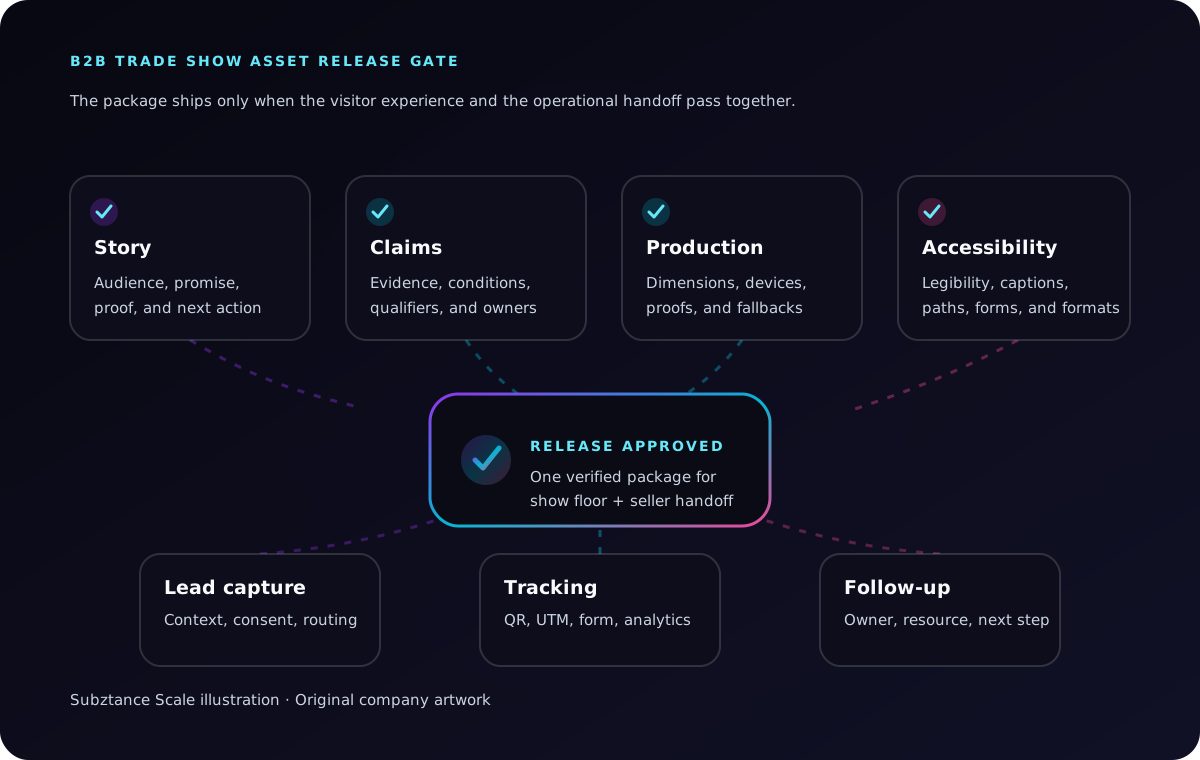
Subztance Scale illustration, based on FTC advertising guidance, CRTC CASL guidance, W3C caption guidance, and Google Analytics campaign URL guidance. Original company artwork.
Story and Proof
- The intended visitor, problem, category, promise, and next action are explicit.
- Product names, availability, partner references, and terminology are current.
- Material claims have approved evidence, conditions, qualifiers, and owners.
- The booth, demo, handouts, landing page, and follow-up use the same core story.
Visual and Production
- Major messages are readable at their intended distance.
- Important content remains inside vendor templates and safe areas.
- Fabrication dimensions, bleeds, colour expectations, resolution, and materials are confirmed.
- Motion, screen, demo, and presentation files are tested on the actual playback hardware.
- Offline alternatives exist for network-dependent content.
Accessibility and Experience
- Type, contrast, labels, interaction targets, and pathways are usable in the intended environment.
- Videos are captioned and do not rely on sound alone.
- Essential information is available in more than one format.
- QR destinations and forms work with a keyboard and at mobile sizes.
- The booth plan accommodates the venue and organizer's accessibility requirements.
Capture, Compliance, and Follow-Up
- The form captures the agreed next step and enough conversation context to act.
- Consent language, data handling, retention, and regional email requirements are approved.
- Each lead category has an owner, service expectation, and appropriate follow-up asset.
- QR codes, UTMs, analytics events, CRM fields, and meeting links are tested end to end.
- Post-show emails, recap content, and seller resources are approved before travel.
Measure the Event Path, Not the Scan Total
Badge scans are an activity count. Evaluate the event against the objective defined in the brief and follow the path into meaningful buyer action.
Track three layers:
Experience Quality
- Relevant booth conversations.
- Demo starts and completed technical walkthroughs.
- Questions, objections, use cases, and resource requests.
- Scheduled meetings kept during the event.
- Engagement with sessions, partner activities, or hosted experiences.
Follow-Up Progress
- Leads with complete conversation context.
- Follow-up delivered by segment and within the agreed service window.
- Replies, resource views, return visits, and meeting acceptance.
- Visits to product, solution, work, pricing, or contact pages.
- Additional stakeholders who engage with shared material.
Commercial and Learning Outcomes
- Qualified evaluations or discovery conversations.
- Opportunities created or advanced where the event played a documented role.
- Partner actions and co-selling activity.
- Content, claim, demo, or product insights that change the next campaign.
- Assets and modules that can be reused at future events.
Freeman's Trust Report recommends measuring return on objective alongside financial ROI, including goals such as brand awareness, customer satisfaction and retention, market expansion, and product-development success. That is a useful discipline: define what the event is meant to change, then decide which evidence can show that change without pretending one scan caused a complex sale. (Freeman, 2025 Trust Report)
Turn Each Show Into a Reusable Event System
After the event, archive more than final artwork. Keep:
- The approved decision brief and message sheet.
- Claim sources, qualifiers, owners, and review dates.
- Modular booth surfaces and their production specifications.
- Demo scripts, recordings, overlays, and fallback files.
- Diagrams, data sheets, presentations, and partner variants.
- Landing-page, QR, UTM, form, routing, and follow-up conventions.
- Photography and video with usage rights and consent records.
- Results, objections, content requests, and recommended changes.
This library makes the next show faster without forcing every event into an identical template. The stable system carries the brand, evidence, production rules, and measurement structure; the event brief determines what should change.
Review Subztance Scale's creative, web, motion, video, and marketing capabilities and B2B work examples when assessing where senior production capacity could support an event program.
Make the Booth the Centre of a Complete Buyer Experience
Start with the buyer action, not the floor plan. Approve one story, design the experience in layers, connect the demo to the evidence, prepare the follow-up before the show, and measure the path beyond the scan.
The result is a booth that can do more than attract attention. It helps the right visitor understand the offer, verify the technical story, carry useful evidence into an internal conversation, and take a relevant next step.
If your team has an important event but not the capacity to coordinate the booth story, technical diagrams, motion, landing page, collateral, partner versions, and follow-up, share the audience, show, product, evidence, and deadline. We can help turn the event into one coherent creative system.
Launch With Every Asset in Sync.
Senior designers who know technical B2B update your datasheets, decks, landing pages and ads, with first drafts in 1–2 business days.
- 14-Day Money-Back Guarantee
- No Contracts, Pause Anytime
- Dedicated Creative Director


