

B2B sales collateral is the set of buyer-facing and seller-facing assets that helps a buying group understand an offer, evaluate its fit, build internal consensus, and take the next step. For a technical product, that usually means a coordinated system of solution briefs, product brochures, data sheets, case studies, sales slides, technical diagrams, and web pages rather than one all-purpose PDF.
The best collateral answers a specific buying question with approved evidence. It also gives sales, partners, and prospects enough structure to find the right level of detail without forcing every reader through the same document.
For technology, data center, and IT hardware marketing teams, a useful sales collateral system has six parts:
- A controlled message-and-evidence source.
- A clear job for each asset.
- A modular visual and content system.
- Useful material for both visible and hidden buyers.
- Accessible, versioned delivery formats.
- Measurement that connects content use to meaningful next steps.
Why Technical Sales Collateral Needs a System
Complex B2B purchases rarely move through one channel or one person. McKinsey's 2026 Global B2B Pulse research, based on nearly 4,000 decision-makers across 13 countries, found that buyers use an average of 10 channels during the purchasing journey. It also identifies inconsistent information and a lack of knowledgeable support as leading drivers of supplier switching. (McKinsey, "The surprising economics of B2B growth")
That creates a design and governance problem. A claim may appear in a product brochure, a partner deck, a landing page, a trade-show screen, and a follow-up email. If each asset is created as a separate project, messages drift, specifications become stale, and teams waste time rebuilding the same explanation.
Subztance Scale illustration based on McKinsey's 2026 finding that B2B buyers use an average of 10 channels. Original company artwork.
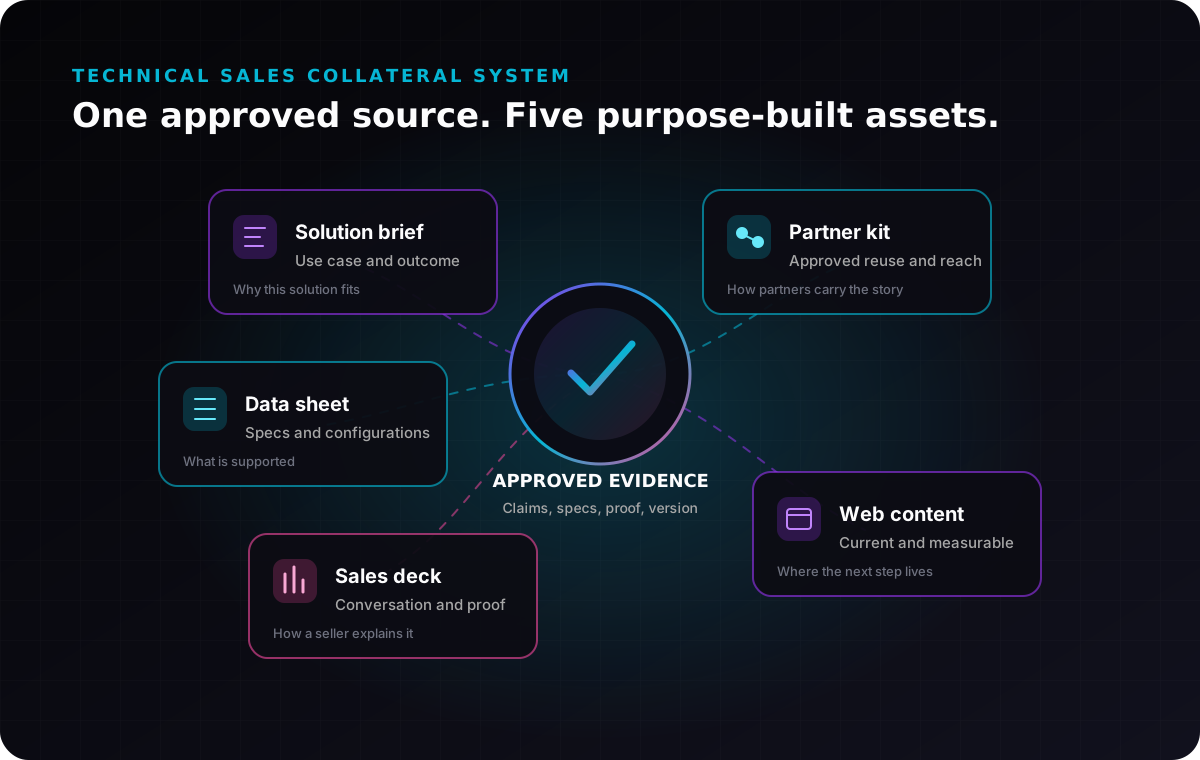
A system starts with one approved product story and turns it into assets with different jobs. This is the deeper operating layer beneath the marketing-collateral section in our guide to B2B graphic design.
Give Every Sales Asset One Primary Job
Before choosing a page count or visual style, decide what question the asset must answer.
Product Brochure
Primary question: Why should this offer matter to our organization?
A product brochure introduces the problem, outcome, differentiators, priority use cases, selected proof, and next step. It should be persuasive enough to create interest but specific enough to survive internal forwarding.
For a server platform, for example, the brochure might connect workload demands to performance, density, deployment, serviceability, and lifecycle value. It should not reproduce every specification table.
Solution Brief
Primary question: How does this solve a particular operational or business problem?
A solution brief is narrower than a general brochure. It organizes the story around an application, industry, workload, or deployment pattern. A data center buyer might need separate briefs for AI infrastructure, virtualization, edge deployment, or liquid-cooled environments.
Technical Data Sheet
Primary question: What exactly is included, supported, and available?
A data sheet should make comparison easy. Use stable product identifiers, structured specifications, supported configurations, physical and environmental requirements, certification status, ordering information, document version, and a route to current technical documentation.
Case Study or Customer Story
Primary question: Has this worked in a relevant situation?
Build the story around the starting condition, decision criteria, implementation, and documented result. Use only approved customer details and measurable outcomes. If an outcome cannot be verified or published, do not turn it into a marketing claim.
Sales Deck and Modular Slides
Primary question: How can a seller guide a live conversation?
The core deck should establish the buyer problem, value story, differentiation, proof, use cases, and next step. Modular slides should let sellers add architecture, comparison, deployment, service, partner, or industry detail without rebuilding the presentation.
Technical Diagram or Architecture Visual
Primary question: How does the product fit, connect, or work?
Use diagrams to make relationships visible: components, data flow, power, cooling, network topology, rack placement, integration, management, or deployment sequence. Keep marketing decoration from competing with labels, direction, and technical meaning.
Landing Page or Resource Hub
Primary question: Where is the current source of truth and what should the reader do next?
The web page should summarize the offer, surface the right resources, and provide a measurable conversion path. It also gives you a current destination when an older PDF continues circulating.
The B2B product launch creative checklist covers how these assets fit into a launch. This guide focuses on how to design and operate the collateral system itself.
Build the Message-and-Evidence Source First
Collateral production should begin with a controlled source, not a blank layout. Create a working document that contains:
- Priority audiences and buying triggers.
- The problem and desired outcome.
- Approved value proposition and short product description.
- Differentiators with evidence.
- Product names, model numbers, and supported configurations.
- Approved performance, compatibility, reliability, security, and sustainability claims.
- Certification and availability status.
- Required disclaimers and restricted language.
- Common objections and approved responses.
- Primary and secondary calls to action.
- Source owner, approver, version, and review date.
For each material claim, record the exact approved wording, evidence location, applicable product or configuration, geography, and owner. If a benchmark only applies to one test setup, the collateral should not imply that it applies to every configuration.
This source does not need to be beautiful. It needs to be current, searchable, and controlled. Creative, product, engineering, legal, sales, and partner teams should know where it lives and which version governs production.
Structure a Technical Brochure for Fast Evaluation
A senior buyer may scan the brochure in a minute. A technical evaluator may return later for detail. The document has to support both behaviours.
A practical structure is:
- Outcome-led cover and opening: State the operating or business result, not only the product category.
- Problem context: Describe the constraint, change, or buying trigger in the reader's environment.
- Solution overview: Explain what the offer is and where it fits.
- Three to five value pillars: Pair each benefit with a feature, mechanism, or proof point.
- Use cases or deployment patterns: Show relevance to specific workloads, environments, or teams.
- Evidence: Add approved data, customer proof, certifications, architecture, or methodology.
- Evaluation detail: Surface essential specifications, compatibility, service, or implementation information.
- Next step: Point to a current web page, technical resource, partner route, contact form, or approved sales action.
Do not hide the product name, version, or CTA in decorative copy. Technical buyers should be able to identify what they are reading, whether it applies to their environment, and where to verify the details.
Design for the Whole Buying Group
The visible product champion is not the only reader. Edelman and LinkedIn's 2025 research describes hidden buyers in finance, legal, compliance, procurement, and operations who may not use the product but can still influence whether a deal advances. The report also found that 71% of hidden buyers have little or no interaction with sales teams. (Edelman, "The Rise of the Hidden Buyer")
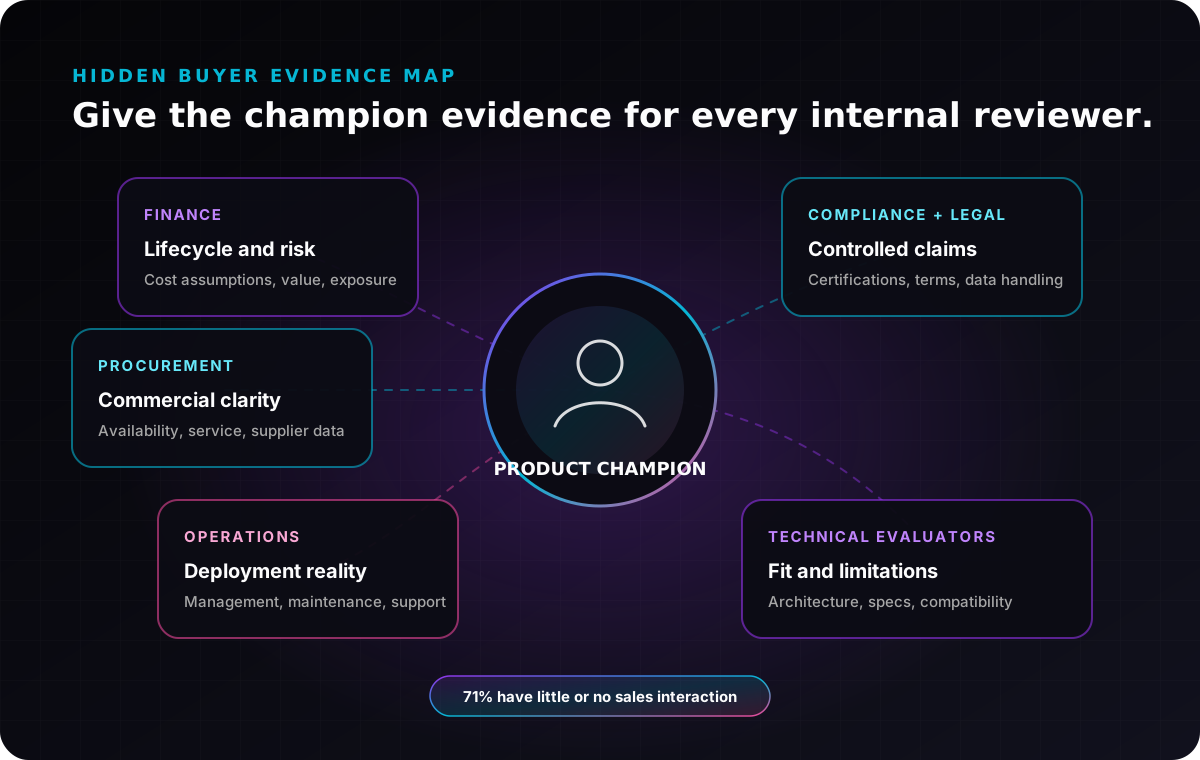
Subztance Scale illustration based on Edelman and LinkedIn's 2025 description of hidden buyers in finance, legal, compliance, procurement, and operations. Original company artwork.
The practical lesson is not to cram every stakeholder concern into one brochure. Give the champion a connected evidence set:
- Finance: total-cost assumptions, commercial model, lifecycle, and risk.
- Procurement: product identifiers, availability, service terms, and supplier information.
- Operations: deployment, management, maintenance, support, and change impact.
- Compliance and legal: certifications, data handling, origin, approved claims, and terms.
- Technical evaluators: architecture, specifications, compatibility, methodology, and limitations.
- Executives: strategic outcome, differentiation, proof, and decision path.
Thought leadership and technical education also matter. The same Edelman report found that hidden buyers often trust substantial thought leadership more than product sheets or brochures when assessing a vendor's capability. Use collateral to connect readers to a useful engineering article, deployment guide, benchmark methodology, or expert point of view rather than expecting a polished PDF to carry the entire decision.
Make the Content Modular Without Making It Generic
Modularity means reusing approved components, not flattening every asset into the same template.
Create reusable blocks for:
- Product descriptions at short, medium, and long lengths.
- Value pillars and supporting evidence.
- Product and application diagrams.
- Specification-table patterns.
- Customer proof modules.
- Industry or workload use cases.
- Comparison and objection-handling slides.
- Calls to action and resource links.
- Footers, version labels, legal text, and contact routes.
This approach supports faster production while preserving purpose. The brochure can lead with outcomes, the data sheet can lead with specifications, and the sales deck can lead with a conversation, even though all three use the same approved source material.
Current research reinforces the value of quality and capability over volume. In Content Marketing Institute's 2026 B2B study of 1,015 marketers, 65% of effective teams pointed to content relevance and quality as something that moved the needle, while 53% cited team skills and capabilities. (Content Marketing Institute, 2026 B2B Content and Marketing Trends)
For a 200- to 1,000-person technical company, a modular collateral system is often more valuable than adding another one-off template. It gives a small marketing team a repeatable way to support new products, industries, partners, and events.
Use Information Design, Not Decoration
Technical collateral succeeds when it makes complex information easier to inspect.
Establish a Scannable Hierarchy
Use a clear document title, descriptive section headings, short paragraphs, meaningful callouts, and consistent page furniture. Avoid making every statistic or phrase compete for the same visual emphasis.
Turn Relationships Into Diagrams
Use a diagram when the reader needs to understand how parts connect. Use a table when the reader needs to compare exact values. Use a chart when the shape of the data matters. Use prose when sequence, nuance, or explanation matters more than geometry.
Protect Legibility
Test the real output, not only the design canvas. Review the PDF at normal laptop size, on a phone, when projected in a meeting, and when printed by an office printer. Check small labels, contrast, line weight, colour dependence, page breaks, and table density.
Keep Proof Beside the Claim
Place the supporting method, qualifier, source, or footnote where readers can find it. A performance number separated from its configuration and test basis creates more questions than confidence.
Treat PDF Accessibility as Production Quality
Many sales assets are distributed as PDFs, but PDF should not be the only format by default. Section508.gov notes that PDFs are often less accessible and less mobile-friendly than digital-first formats, and recommends choosing formats that support accessibility and responsiveness. (Section508.gov, "Create Accessible PDFs")
When a PDF is necessary:
- Export a tagged PDF from the source file rather than printing to PDF.
- Use a logical heading hierarchy and reading order.
- Tag lists and tables correctly.
- Give informative images meaningful alternative text.
- Mark decorative elements as artifacts.
- Use descriptive link text and confirm keyboard access.
- Set the document title and language.
- Check colour contrast and avoid using colour alone to convey meaning.
- Run an accessibility checker, then test the reading order and links manually.
W3C's PDF techniques explain that correctly tagged headings help assistive-technology users navigate directly to important sections. (W3C WCAG technique PDF9)
For high-value resources, publish an accessible HTML version alongside the download. The web page is easier to update, measure, search, and read across devices, while the PDF remains useful for forwarding, annotation, and offline review.
Create a Review and Version-Control Workflow
Technical collateral often fails at the handoff between accurate source material and production output. Use a review workflow with explicit responsibilities:
Content Review
- Product names, terminology, and value story are consistent.
- The document answers its assigned buying question.
- Claims are supported and properly qualified.
- The CTA and destination match the reader's stage.
Technical Review
- Specifications, units, configurations, diagrams, and compatibility are correct.
- Tables match the current product source.
- Certifications and availability are current.
- Limitations and assumptions are visible.
Creative and Production Review
- Hierarchy, typography, contrast, and diagram labels remain legible.
- Links, QR codes, page numbers, and bookmarks work.
- The source file, fonts, linked assets, and final exports are archived.
- PDF tags, reading order, and alternative text are checked.
Distribution Review
- The web page and download use the current file.
- Sales and partners know what changed.
- Superseded files are clearly archived.
- The filename and document footer include a useful version or date.
One person should own the release, but no single reviewer should approve every discipline.
Measure Use, Not Just Downloads
A download count does not show whether the collateral helped a deal. Connect distribution to the next useful action.
Track:
- Resource-page visits and engaged sessions.
- Downloads by source, campaign, partner, and audience.
- Clicks from the asset to technical documentation, product pages, contact forms, or partner routes.
- Sales usage and repeated requests.
- CRM opportunities that touched a resource where your systems support that connection.
- Questions that reveal missing or unclear content.
- Assets that sales or partners keep recreating themselves.
Google Analytics recommends consistent campaign URL parameters because inconsistent naming can fragment reporting. Define utm_source, utm_medium, and utm_campaign, and use utm_content when you need to distinguish collateral variants. (Google Analytics, campaign URL guidance)
Use the findings to improve the system. If a data sheet gets traffic but readers repeatedly ask about deployment, add a deployment guide or a clearer architecture section. If partners build their own slides, provide better modular source files.
Decide How to Staff Ongoing Collateral Production
The hard part is rarely the first brochure. It is keeping the whole system current while launches, partner requests, sales decks, event deadlines, web updates, motion, and customer proof compete for the same team.
Map the required capabilities before choosing a staffing model:
- Product marketing and technical copy.
- Brand and editorial design.
- Information design and technical diagrams.
- Presentation design.
- Web design and development.
- Motion graphics and video.
- Production art, localization, and accessibility QA.
- Marketing operations and measurement.
An internal team can own product knowledge and governance while external specialists add production capacity or missing disciplines. If you are comparing models, review how Subztance Scale's creative services, prioritized subscription workflow, and selected work fit the volume and complexity of your collateral roadmap.
Turn Sales Collateral Into an Operating Asset
Start with the five assets sales and buyers use most. Assign one job to each, build the message-and-evidence source, create reusable modules, establish a review gate, and connect every asset to a current web destination.
Then review the system quarterly:
- Which documents are still used?
- Which claims, diagrams, and specifications changed?
- Which stakeholders lack the evidence they need?
- Which one-off requests should become reusable modules?
- Which assets should move to accessible HTML?
- Which content influenced a useful next step?
That is how sales collateral becomes more than a folder of finished files. It becomes a maintained decision-support system for buyers, sellers, partners, and the marketing team.
If your team needs senior creative capacity to build or refresh that system, tell us which products, audiences, and sales assets are in scope. We can help prioritize the work and turn approved technical content into a coherent set of web, document, presentation, diagram, motion, and video assets.
Launch With Every Asset in Sync.
Senior designers who know technical B2B update your datasheets, decks, landing pages and ads, with first drafts in 1–2 business days.
- 14-Day Money-Back Guarantee
- No Contracts, Pause Anytime
- Dedicated Creative Director


