

B2B content offer design is the process of turning useful expertise into an asset that a buying group can understand, trust, share internally, and act on. The finished offer may be a technical guide, buyer's guide, benchmark report, decision brief, workbook, or webinar package, but the real deliverable is a coordinated system: the core content, its landing page, the promotion assets, the sales follow-up, and the measurement plan.
For a technology, data center, or IT hardware company, a strong content offer does more than look polished. It frames a decision, translates technical evidence for multiple stakeholders, and gives the reader a practical next step without disguising a product brochure as independent insight.
A useful B2B content offer system has seven parts:
- A specific buyer decision or operating problem.
- A differentiated point of view supported by approved evidence.
- A format matched to the reader's job.
- A scannable, accessible core asset.
- A landing page and gate strategy that fit the value exchange.
- Modular promotion and sales-enablement assets.
- Measurement that follows the path from attention to qualified action.
Why B2B Content Offers Need a Design System
Producing a PDF is easy. Producing an offer that earns attention, survives internal forwarding, and creates a measurable next step is harder. Content Marketing Institute's 2026 B2B research found that 40% of respondents named creating content that prompts a desired action as a top challenge, while 39% cited resource constraints and 33% cited measuring content effectiveness. (Content Marketing Institute, 2026 B2B research)
The same research found that 68% of B2B marketers collect first-party data through gated assets, webinars, or interactive tools. Yet its practical recommendation is to remove “vanity gates” and connect the signals already available through customer relationship management and behavioural data. A form is not proof that an offer is valuable. It is a trade: useful information for a reader's time, attention, and sometimes contact details.
That trade matters because the visible lead is not the whole buying group. The 2025 Edelman–LinkedIn B2B Thought Leadership Impact Report found that 55% of hidden decision-makers use thought leadership to vet potential vendors, and 64% trust it more than marketing materials and product sheets when assessing capabilities. (Edelman and LinkedIn, 2025 B2B Thought Leadership Impact Report)
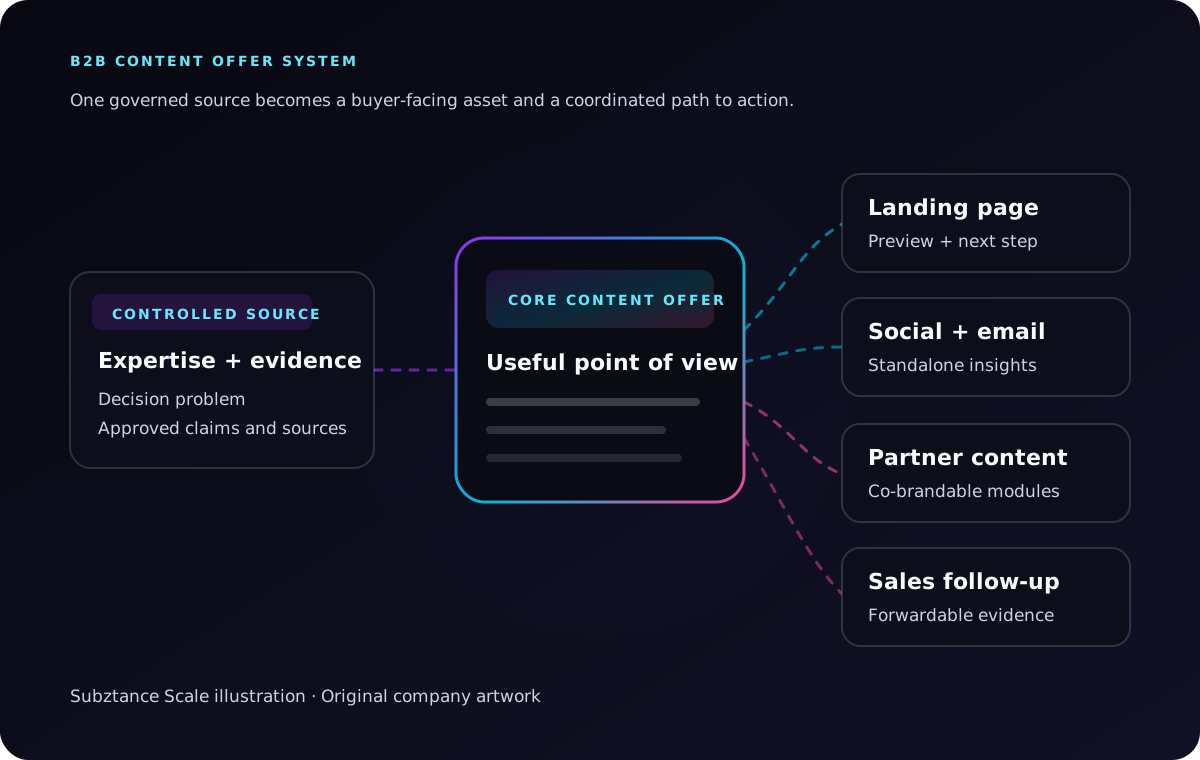
Subztance Scale illustration, informed by Content Marketing Institute's 2026 B2B research and the 2025 Edelman–LinkedIn report. Original company artwork.
The design system therefore has two jobs. It must make the insight easy to consume, and it must keep the story coherent as the offer moves between a landing page, email, LinkedIn post, partner channel, seller conversation, and internal buyer review.
Start With the Decision the Reader Needs to Make
Do not begin with “we need an ebook.” Start with the decision, risk, or operating question that deserves a useful answer.
A decision-focused brief should define:
- Ideal reader: The role, company type, operating environment, and level of technical knowledge.
- Buying situation: The event or constraint that makes the topic urgent now.
- Decision question: What the reader should be better equipped to decide after using the offer.
- Unmet information need: What existing search results, vendor pages, or internal resources fail to explain.
- Point of view: The conclusion or framework the organization is prepared to support.
- Evidence: Approved research, product data, expert input, standards, and documented examples.
- Reader action: The practical next step inside the asset and the commercial next step after it.
- Distribution context: The channels, sales motions, partner programs, or events that will carry the offer.
For example, a data center infrastructure manufacturer could create a planning guide for marketing and operations leaders evaluating higher-density deployments. The useful decision is not “which vendor should I buy from?” It is “which facility, power, cooling, serviceability, and workload assumptions must our team validate before comparing platforms?”
That framing makes the content useful before a sales conversation. It also creates natural places for approved product evidence later, without forcing the entire guide into a product pitch.
If the content supports an active go-to-market program, connect this decision brief to the evidence source and channel plan described in our B2B campaign design guide.
Choose a Format That Matches the Buying Job
The format should reduce the work the reader must do next. Page count is a production detail, not a strategy.
Technical Guide
Use a guide when the reader needs to understand a system, process, or unfamiliar technical decision. Organize it around questions, dependencies, trade-offs, and a practical sequence.
Examples include a liquid-cooling readiness guide, an AI-infrastructure deployment primer, or a guide to evaluating lifecycle support for edge hardware.
Buyer's Guide
Use a buyer's guide when the audience needs evaluation criteria. It should define the category, clarify requirements, expose trade-offs, and provide a usable comparison framework.
Avoid writing a disguised feature checklist in which every criterion conveniently matches your current product. A credible guide helps a buyer ask better questions, even when the answer does not automatically favour the author.
Benchmark or Research Report
Use a report when the organization has original data, a transparent methodology, and an insight worth publishing. Design the methodology, sample, definitions, and limitations as carefully as the headline findings.
One strong chart with a clear source and explanation is more useful than a page of decorative statistics.
Decision Brief or Executive Primer
Use a short brief when hidden buyers or executives need the issue, implications, evidence, and recommended next step quickly. This format works well when a technical buyer must circulate the case to finance, procurement, security, facilities, or leadership.
Workbook or Assessment
Use a workbook when the reader must gather inputs, score readiness, or align a team. The value comes from prompts, worksheets, definitions, and decision rules—not from empty pages branded as interactivity.
For product-specific brochures, data sheets, solution briefs, and seller-facing materials, use the deeper asset-governance model in our B2B sales collateral guide.
Build a Controlled Evidence Package Before Layout
Technical content often crosses marketing, product, engineering, legal, sales, and partner teams. Put the evidence in order before the visual design multiplies it.
Create a working evidence package with:
- The approved thesis and supporting arguments.
- Source links, publication dates, authors, and access dates.
- Product names, model numbers, configurations, and terminology.
- Performance, compatibility, sustainability, security, and availability claims.
- Test conditions, geography, time period, and other material qualifiers.
- Diagrams, screenshots, photography, and their rights information.
- Expert contributors and the specific sections they can validate.
- Required legal, partner, or standards review.
- A content owner, review date, and version number.
Keep the evidence beside each material claim. If a performance figure applies to one firmware version, workload, rack configuration, or laboratory method, the design must not separate the number from that context.
This is also the moment to identify missing proof. A blank evidence field should trigger research or a narrower claim, not a decorative icon and stronger adjective.
Design the Core Asset for Scanning and Forwarding
The core asset should work for the first reader and the colleague who receives it without context. Design for a person who may open the file between meetings, scan the headings, inspect two diagrams, and forward only the pages relevant to another stakeholder.
Lead With the Useful Answer
Use the first page or opening screen to state:
- Who the offer is for.
- What decision or problem it addresses.
- The main conclusion or framework.
- What the reader will be able to do with it.
- Who produced it and when it was last updated.
Do not spend the opening pages congratulating the reader for downloading the asset or describing the author's company history.
Build a Visible Information Hierarchy
Use descriptive headings, short sections, summary callouts, diagrams, tables, and repeated page structures to make the logic visible. W3C guidance notes that headings and subheadings help readers understand an outline and navigate to the information they need; for PDFs, its techniques also cover tagged headings, text alternatives, links, tables, titles, and logical reading order. (W3C Web Accessibility Initiative, WCAG 2.2 techniques)
For a hardware or infrastructure offer, useful visual modules might include:
- A system architecture or deployment sequence.
- A comparison of operating conditions or configuration choices.
- A decision tree for selecting an approach.
- A labelled product or facility diagram.
- A risk-and-mitigation summary.
- A checklist that can be used in an internal review.
Every diagram needs a reason to exist. If the same information is clearer in three sentences, use the sentences.
Make the Style Distinct but the Voice Human
Distinctive design is not cosmetic. Edelman and LinkedIn found that 60% of hidden decision-makers associate a unique format or style with above-average or top-quality thought leadership. The same report found that 57% prefer primer-style content with quick takeaways over an academic-style deep dive, and 65% prefer a more human, less formal tone.
That does not mean removing technical depth. It means creating layers: an executive summary and visible takeaways for fast readers, then evidence, diagrams, methodology, and specifications for those who need to verify the argument.
Design the Landing Page and Gate as Part of the Offer
The landing page is not packaging around the “real” asset. It is the first part of the experience and often the only page a potential reader sees.
It should answer five questions quickly:
- Is this for someone like me?
- What problem will it help me solve?
- What will I receive or learn?
- Why should I trust the source?
- What happens when I take the next step?
Use one clear H1, a concise value statement, a preview of the framework or takeaways, evidence of authorship, and an honest CTA. Show enough substance that the visitor can evaluate the offer before submitting a form.
Decide Whether the Offer Should Be Gated
Gate the asset when the follow-up creates legitimate value and the information requested is proportionate to the offer. A detailed assessment, briefing request, event follow-up, or high-value technical package may justify a form.
Leave it open when reach, authority, partner sharing, search visibility, or frictionless sales enablement matters more than capturing a lead. A hybrid model can publish the core guide openly while offering an editable worksheet, comparison template, briefing, or update subscription as the conversion.
If a form is used:
- Ask only for information the next step actually needs.
- Explain how the information will be used.
- Make the asset or confirmation available immediately.
- Test validation, error messages, keyboard access, and mobile layout.
- Route the lead to an owner with relevant context.
- Keep the privacy notice easy to find.
Protect the Page Experience
Do not let a large decorative hero, autoplay video, or heavy third-party form make the offer feel slow. Google's Core Web Vitals measure loading performance, visual stability, and responsiveness; Google recommends an LCP of 2.5 seconds or less at the 75th percentile. (web.dev, Core Web Vitals guidance)
Reserve image dimensions, compress media, use live text for essential copy, and test the full form-to-delivery path on a real mobile connection.
Turn One Core Offer Into a Channel System
The offer should not disappear after the launch email. McKinsey's B2B Pulse research found that buyers use an average of 10 interaction channels across the buying journey, with the company website, in-person sales, and video conference among the most frequently used touchpoints. (McKinsey, 2024 B2B Pulse)
Build a modular distribution package from the same approved source:
- Landing page: The promise, preview, author, evidence, CTA, and related resources.
- Email: A role-specific problem, one useful takeaway, and the relevant next step.
- Organic social: A diagram, short framework, expert observation, or carousel that stands on its own.
- Paid media: Focused message variations that lead to the same offer, not cropped cover art.
- Partner content: Co-brandable copy, visual modules, tracking links, and clear edit boundaries.
- Sales follow-up: A short email, modular slides, and the pages or diagrams most useful in evaluation.
- Trade show and webinar use: Session graphics, handout or QR destination, speaker slides, and post-event follow-up.
- Short-form video or motion: A concise explanation of the core framework with captions and a static alternative.
Do not force every channel to summarize the entire offer. Give each asset one job: create curiosity, explain one idea, provide proof, help internal sharing, or prompt the next conversation.
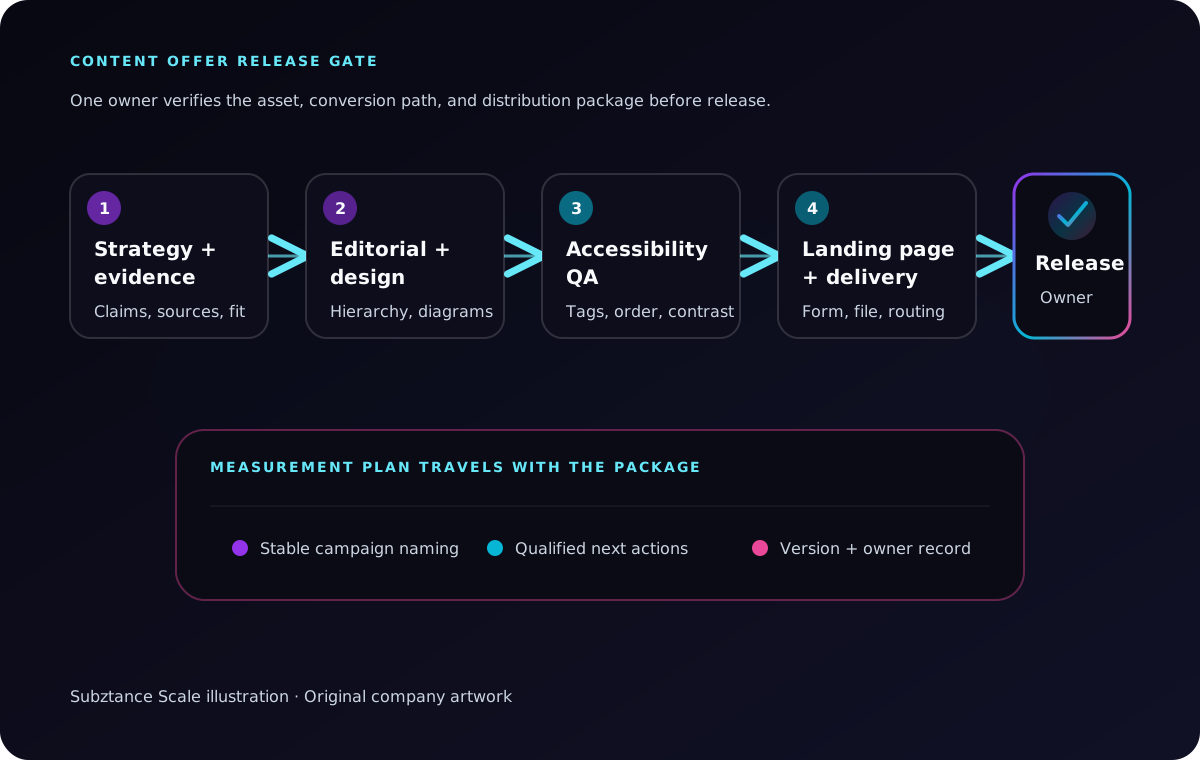
Subztance Scale illustration, based on W3C accessibility techniques, the U.S. Section 508 PDF resources, and Google Analytics campaign URL guidance. Original company artwork.
Establish a Content Offer Release Gate
Use one release owner and a checklist that covers the core asset, landing page, promotion files, and follow-up path.
Strategy and Evidence Review
- The intended reader and decision problem are explicit.
- The main point of view is useful and defensible.
- Material claims have current sources and necessary qualifiers.
- Product, partner, and customer references are approved.
- The CTA matches the reader's likely next step.
Editorial and Design Review
- The opening gives the answer before the company story.
- Headings, summaries, diagrams, and page rhythm support scanning.
- Charts preserve scales, labels, units, sources, and methodology.
- Typography and contrast remain legible at actual size.
- The cover, landing page, social assets, and sales slides feel related without becoming identical templates.
Accessibility and Document Review
- Heading structure is logical and tagged in the final PDF.
- Informative images and charts have useful text alternatives.
- Tables use proper headers and a logical reading order.
- Link text describes its destination.
- The document title and language are set.
- Keyboard order and form controls work as intended.
Section508.gov provides baseline and detailed PDF testing checklists, and its published checklist includes document tags, titles, language, contrast, reading order, meaningful content tags, and alternatives for images. (Section508.gov, accessible PDF resources)
Production and Delivery Review
- File names, versions, dates, and owners are visible.
- Web and PDF links resolve to the intended destination.
- The downloadable file is compressed without making diagrams unreadable.
- Form submission, confirmation, delivery, and CRM routing work.
- Tracking parameters use a documented naming convention.
- Superseded files are removed from active partner and sales locations.
Measure the Path, Not Just the Download
A download can mean strong interest, mild curiosity, a competitor, a student, or an accidental click. Measurement should connect the offer to the buying journey without pretending that one asset caused a complex sale.
Track three layers:
Attention and Consumption
- Qualified landing-page sessions.
- Engagement with the page and offer preview.
- CTA and form-start rate.
- Form completion or open-asset clicks.
- Document, video, or webinar completion where available.
Buyer and Team Progress
- Return visits from relevant accounts.
- Visits to product, solution, pricing, work, or contact pages.
- Sales use of the offer in active opportunities.
- Partner adoption and referral traffic.
- Follow-up questions that reveal evaluation intent.
Commercial Outcomes
- Qualified conversations or assessment requests.
- Sales-accepted leads.
- Opportunities where the offer was used or shared.
- Pipeline influence, with the attribution limitations documented.
- Topics and formats that lead to stronger next actions.
Google Analytics recommends consistent utm_source, utm_medium, and utm_campaign values, with utm_content available to distinguish creative variations. It also warns that inconsistent capitalization and naming can fragment reporting. (Google Analytics, campaign URL guidance)
Give each distribution asset a stable identifier. A practical pattern is:
offer-audience-channel-format-version
For example:
density-guide-facilities-linkedin-diagram-v02
Record the hypothesis beside the identifier. If the diagram version outperforms the cover-art version, the lesson should be “facilities leaders responded to a decision framework,” not simply “version two won.”
Staff for an Ongoing Content Offer Program
The subject-matter expertise should stay close to the business. Internal leaders can own the audience, technical truth, point of view, approvals, and commercial follow-up. The production load then spans editorial design, data visualization, illustration, web, landing-page development, motion, video, presentation work, paid formats, partner variants, and document QA.
Before choosing a production model, estimate:
- Number of major offers per quarter.
- Expert and approver availability.
- Research, writing, and design complexity.
- Web, motion, video, and event requirements.
- Audience, partner, and regional variants.
- Update frequency and content shelf life.
- Peak periods around launches and trade shows.
If the need is continuous, the constraint is rarely one PDF. It is the sequence of core assets, landing pages, campaign variants, seller materials, updates, and measurement improvements that follow.
Review the creative, web, motion, video, and marketing services available through Subztance Scale and the prioritized subscription workflow when comparing ways to add senior production capacity. For an offer tied to a product introduction, coordinate the content system with the B2B product launch creative checklist.
Build One Offer That Can Keep Working
Choose one technical question your ideal buyer must answer this quarter. Define the decision, collect the evidence, build a format that reduces the reader's work, and design the landing page and distribution system at the same time as the core asset.
Then retain what should outlive the launch:
- The approved evidence and source record.
- Editorial, diagram, and page components.
- Landing-page and promotion modules.
- Accessibility and release checks.
- Partner and sales enablement files.
- Measurement conventions and performance learnings.
The result is more than a gated PDF. It is a reusable way to turn technical expertise into buyer education, internal consensus, and a credible commercial next step.
If your team has an expert idea but not the capacity to turn it into a complete content offer system, share the audience, topic, evidence, channels, and deadline. We can help shape and produce the core asset, landing page, campaign graphics, diagrams, partner versions, presentation content, motion, and video.
Launch With Every Asset in Sync.
Senior designers who know technical B2B update your datasheets, decks, landing pages and ads, with first drafts in 1–2 business days.
- 14-Day Money-Back Guarantee
- No Contracts, Pause Anytime
- Dedicated Creative Director


